Wakapi
Wakapi collects coding heartbeats from compatible editor clients and turns them into project and language statistics. Deploying the server does not install an editor extension or begin monitoring anyone automatically. Each user must configure a client and understand what metadata it sends.
The version 2.12.2 fixture completed owner signup, login, API-key rotation, authenticated heartbeat submission, dashboard readback and persistence after restart. The screenshots show controlled test activity, not customer productivity data. All-editor compatibility, report delivery and disaster recovery remain unverified.
Before You Start
You need a Moltern workspace with service-creation permission, a target environment and an editor supported by the client you intend to use. Prepare a strong application password and review what project names, file paths and machine metadata the client collects.
The chart uses an embedded database and does not provision an external database dependency. The deployment password salt protects stored password hashing; it is not the password you will use to sign in. Keep this salt stable when modifying a populated instance.
Deploy In Moltern
- Select Wakapi in Services.
- Choose a name, environment group and environment.
- Keep the generated password salt securely configured.
- Review CPU, memory and storage through Preview deploy.
- Confirm deployment, wait for the running state and open the URL.
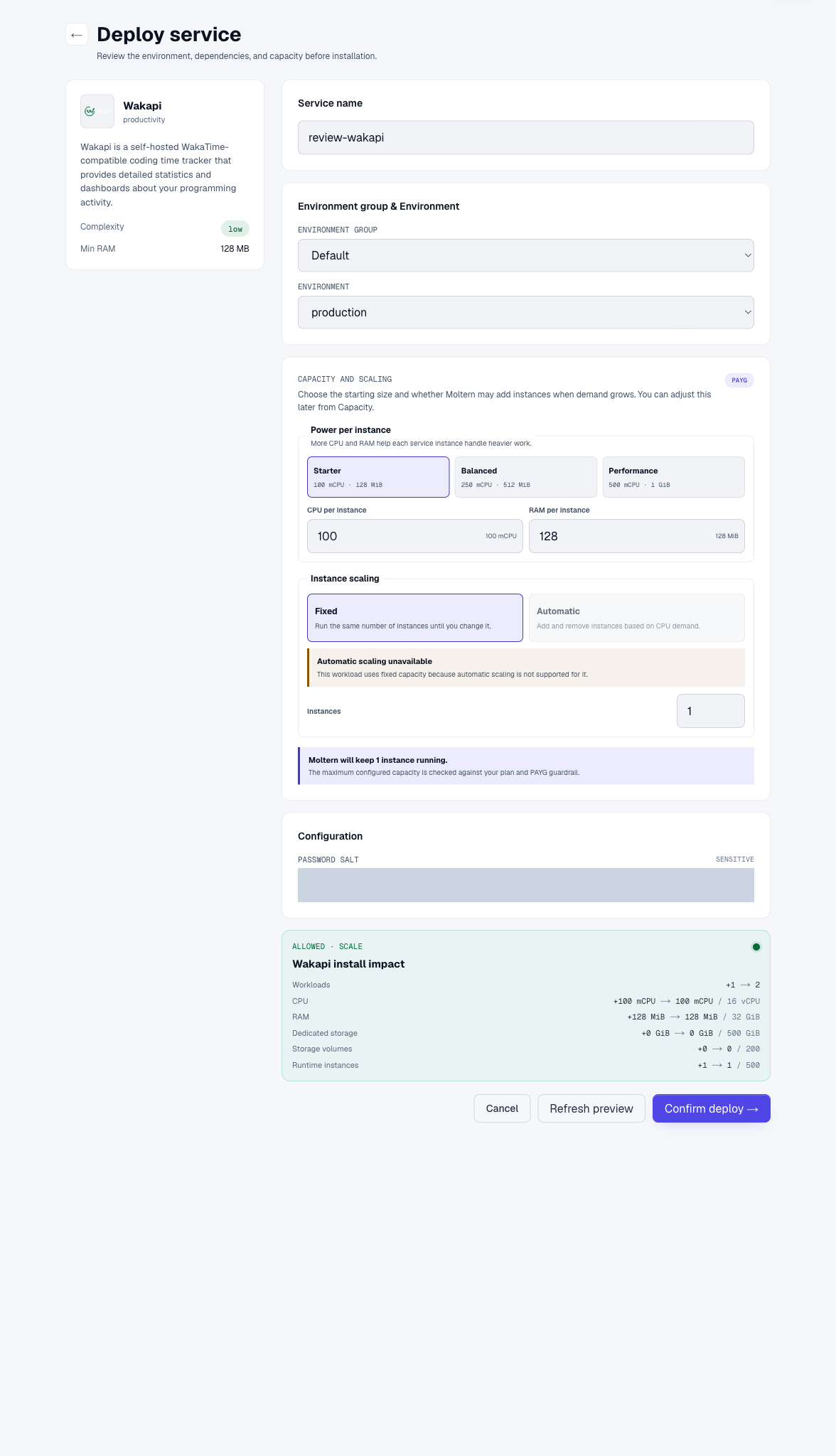
Use one fixed instance for the tested embedded-database configuration. Changes to runtime size may cause a short interruption. Zero additional dedicated storage in the preview does not mean coding statistics consume no workspace storage.
Create The First Account
Choose Login, then Sign up. Enter a username and strong password. An email address is optional in the tested form, but is needed for features such as password recovery and reports when mail delivery is configured.
The first account receives administrative privileges. Complete this step before sharing a fresh URL, then review registration and permissions. After Create Account, the site returns to its start page with a success message. Select Login again to enter the dashboard.
This is a separate account inside Wakapi. Moltern login and protected connection details do not automatically recover a password created in Wakapi.
Connect Your Editor
The empty dashboard displays setup instructions, your service's API URL and your personal API key. Treat this screen as sensitive. Do not include it in screenshots, recordings or support tickets.
Install the WakaTime-compatible client for your editor following its official instructions. Configure the instance API URL and key in your local client settings:
[settings]
api_url = https://YOUR_WAKAPI_HOST/api
api_key = YOUR_PERSONAL_WAKAPI_KEY
Use your real hostname and private key locally; the values above are placeholders. Protect the configuration file and do not commit it. Review the client's include/exclude and privacy options before enabling it in sensitive projects. Then work briefly in a disposable project and open the dashboard.
A successful result contains the expected project and language, a nonzero heartbeat count and activity time. A healthy server page with no submitted events is not an end-to-end client test.
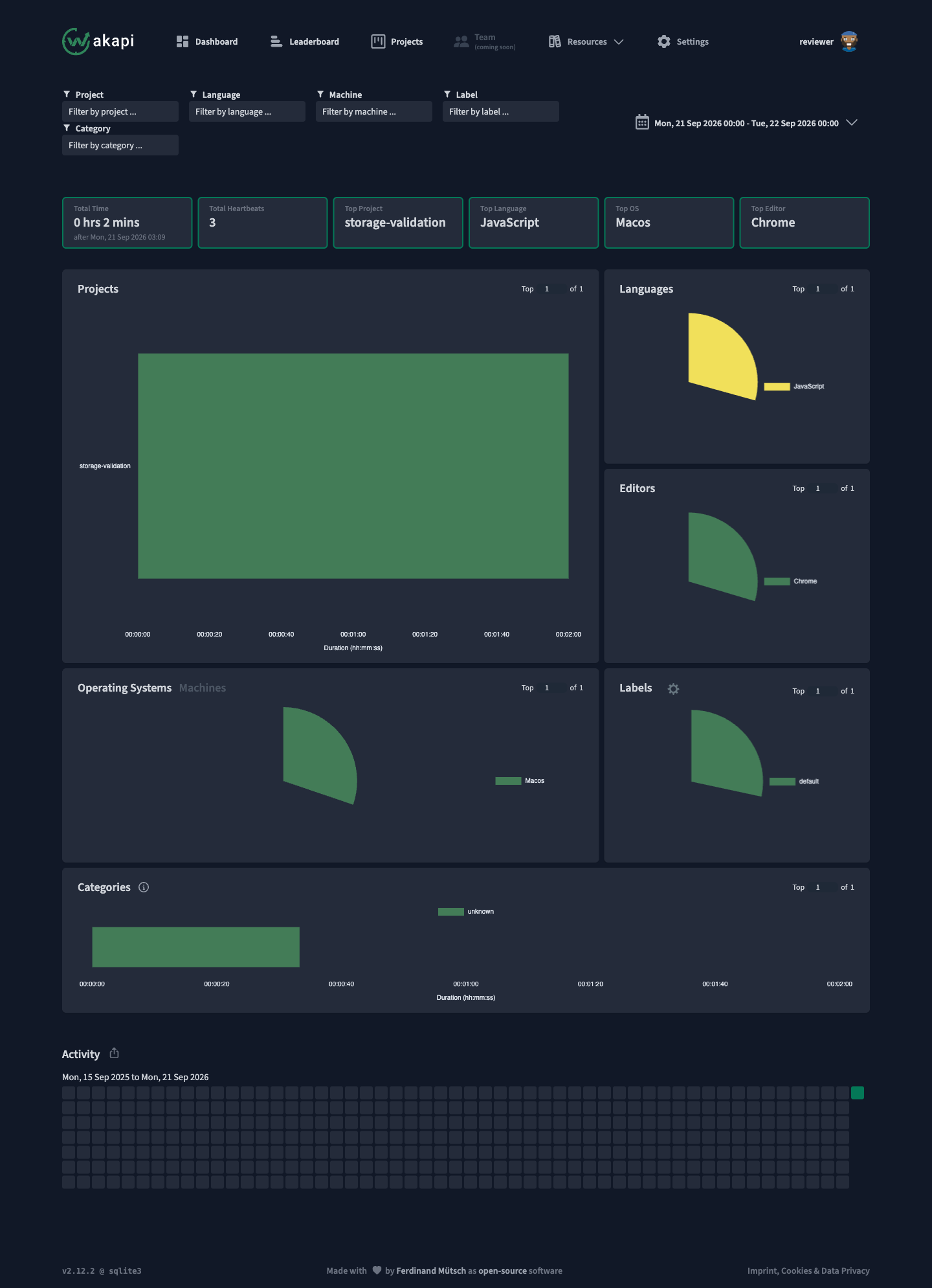
The validation client submitted three events for a harmless JavaScript file; the actual dashboard displayed two minutes and three heartbeats. This does not certify every editor extension. Time ranges and timezone settings affect which events appear in summaries.
Protect And Rotate Client Access
Each user should use their own API key. To replace it, open Settings > Danger Zone > Reset API key. Confirm the action, then update every configured client. The old key should no longer be able to submit or read activity.
In the test, unauthenticated requests and the previous key returned 401, while the replacement key accepted events. The tested server expects its API key to be encoded in the authentication header according to its version-specific API protocol. Prefer a compatible client over inventing a custom header format.
An agent can act as a client only with explicitly intended access and a securely supplied credential. Do not grant the entire account's activity history merely to allow one project to send events. Moltern agent attachment remains a separate validation step.
Persistence, Capacity And Backup
After runtime replacement, signing in with the existing account showed the same project and heartbeat count. A session expiring is different from database loss. Changing the password salt can break password verification; preserve it with your recovery material.
Use Live Logs to investigate startup or ingestion errors. Review Capacity as activity grows. Check data retention settings deliberately: deleting old heartbeats can affect the ability to rebuild summaries.
Maintain a version-compatible backup of data and essential configuration, and test restoration into an isolated instance. The Regenerate Summaries action recomputes statistics; it is not a backup and can be disruptive. Do not run destructive maintenance to fix a simple date-filter problem.
Billing uses sampled workspace storage and configured runtime capacity. Small statistics databases can round to zero GiB. Complete elapsed-time billing reconciliation and backup recovery are not certified here.
Troubleshooting
| Symptom | Next check |
|---|---|
| No data after deploying | Install and configure a client; deployment alone sends no heartbeats. |
| Client gets 401 | Instance URL, current personal key and correct client authentication format. |
| Events accepted but summary empty | Selected date, timezone, project filters and aggregation delay. |
| Logged out after restart | Sign in with the existing account and check its data. |
| Login breaks after configuration edit | Preserve the original password salt; do not reset the database. |
| Reports or reset emails absent | Configure and verify delivery separately. |
Delete A Test Instance
Export or back up needed activity first. Choose Delete Service in Moltern, select whether stored data is deleted or retained, and complete account confirmation. Retained files still count toward storage. Remove the old endpoint and key from your editor clients so they stop sending to a deleted service.
Frequently Asked Questions
Does Moltern track my editor automatically?
No. You choose and configure a client. Review its metadata and privacy settings.
Is the deployment salt my login password?
No. Create an account in Wakapi and keep its password separately. Keep the salt stable for that installation.
Does rotating the key erase activity?
No data deletion was observed in the tested rotation. It invalidates old client credentials; update those clients before expecting new activity.