Vikunja
Vikunja organizes tasks into projects for individuals and teams. Start with a small project and a few tasks before moving an existing workflow. Moltern runs the service; project membership and task access are configured inside Vikunja.
Owner registration, login, task creation and task readback after an orderly runtime replacement have been tested. External database migration, concurrent write durability, email delivery, agent integration and full export/restore are not certified by these checks.
Before You Start
- Select a Moltern workspace and environment where you can create services.
- Prepare a separate Vikunja username and strong password.
- Use an email address you control when creating your actual account.
- Review runtime capacity and available storage.
- Begin with non-sensitive tasks until you have checked access settings.
The tested template uses an embedded database with no external dependency service. It stores task data in its persistent service allocation. A third-party database option in upstream documentation does not mean an existing instance can safely change database engines through a single setting.
Deploy In Moltern
- Choose Vikunja from Services.
- Enter a service name and select the environment.
- Review Capacity and scaling. Use one fixed instance for this template.
- Select Preview deploy and check capacity and storage impact.
- Confirm deployment, wait for startup and open the generated URL.
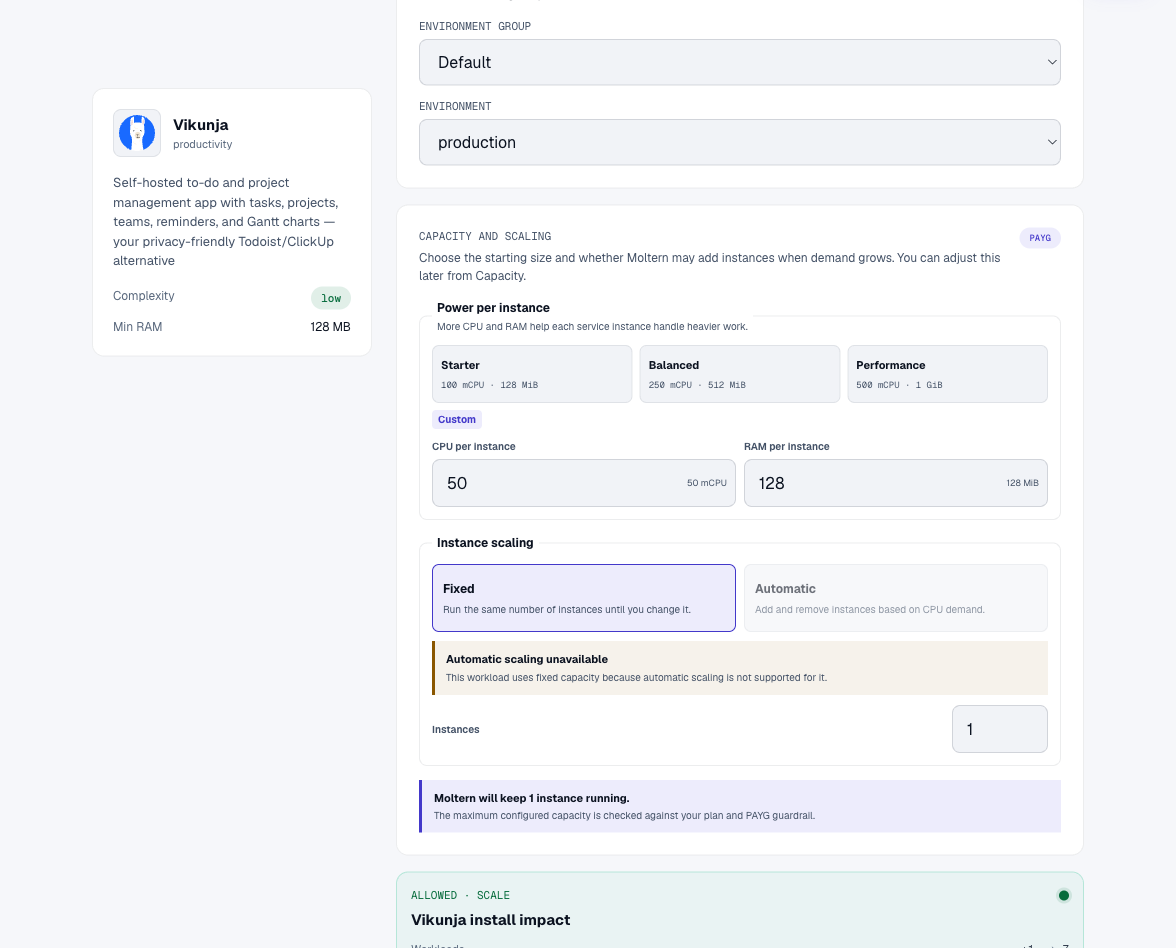
The preview can show zero dedicated storage because the service uses workspace storage. That is not a statement that tasks and attachments are free of storage usage.
Create Your Vikunja Account
On the product login page, choose Create account. Enter your username, email and password, then submit the form and log in if prompted. Save this credential in your password manager.
Your Moltern account does not automatically sign you into Vikunja. A password created inside the application is not automatically copied into Moltern's protected connection details. Do not assume that an email reset can work until outbound email has actually been configured and tested.
Complete initial setup before sharing the URL. Review registration and project sharing settings in the installed product version; a reachable site alone does not establish a private team workspace.
Create And Reopen A Task
- Open the task list after signing in.
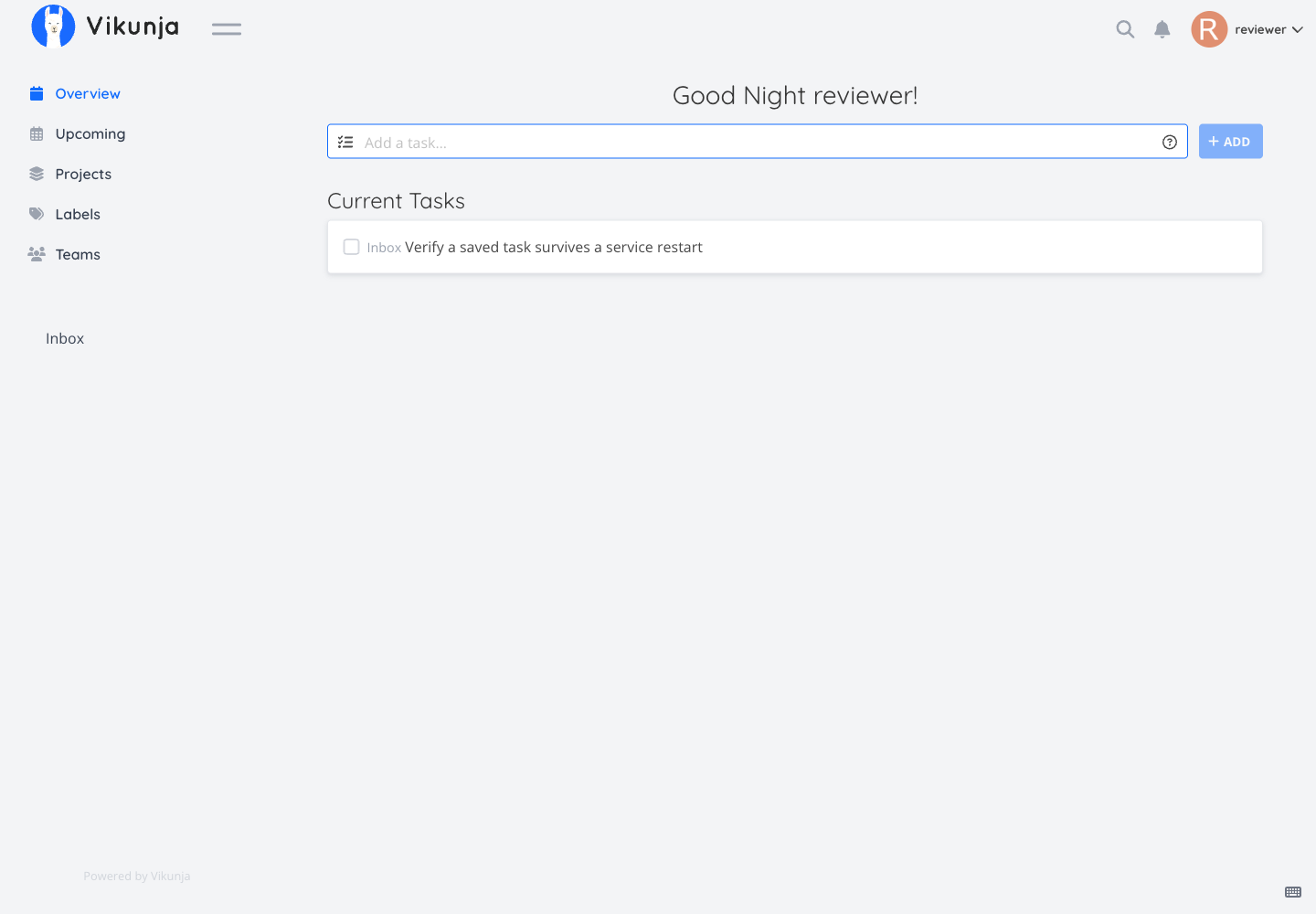
- Enter a recognizable task in Add a task....
- Select Add and check that the task appears in the saved list.
- Open the task to add details as needed.
- Reload the page and find the original task again.
Separate projects when tasks have different audiences. Before inviting a colleague, check the project's actual sharing settings and verify access with a non-owner account. Automatic membership synchronization from Moltern is not promised by this guide.
For a persistence check, use a disposable task whose name you can recognize after a restart. Do not recreate it before confirming whether the original survived.
Applications, Agents And Credentials
A public URL is a location, not permission to modify tasks. An application or coding agent needs a supported Vikunja authentication method with the minimum necessary project access. Keep credentials in protected settings rather than in prompts, source code or screenshots.
Moltern's private connection controls and Vikunja's task permissions are separate layers. Removing a connection should be tested from the client as well as in the settings screen. Complete API-token and coding-agent workflows for this template remain on the validation checklist.
Persistence, Operations And Backup
The saved task survived a complete stop/start replacement and login with the same owner account. A browser session may expire during replacement without the underlying task being lost. Log in and inspect the existing list first.
Use Live Logs for startup failures and Capacity for CPU or memory changes. Changes may interrupt the service. Do not use multiple independent replicas against the embedded database unless a supported, tested configuration permits it.
Keep independent exports or backups of important projects and attachments. Export availability and restoration procedures depend on the installed version. Test a restore into a separate instance, checking task details and files, before treating a backup as usable. Restart persistence is not disaster recovery.
Billing > Storage by workload is sampled, not a live counter. A tiny task database may display zero GiB after rounding even though data exists. Compare measurement freshness before reporting missing metering. Exact billing proration remains a separate open validation item.
Troubleshooting
| Symptom | What to check |
|---|---|
| Moltern credentials rejected | Use the account created inside Vikunja. |
| Task disappears when navigating | Check the correct project and filters; confirm Add completed. |
| Logged out after restart | Sign in again and check the original task before changing storage. |
| Password-reset email absent | Email delivery must be configured and tested, not assumed. |
| Colleague cannot see a project | Check Vikunja project membership and permissions. |
| URL temporarily unavailable | Wait for startup, then inspect Moltern status and Live Logs. |
Delete A Test Workspace
Keep a backup of anything important. In Moltern, select Delete Service and review Delete stored data versus Keep workspace files. Complete account confirmation when requested. Deleting stored data is irreversible; keeping files does not stop their storage usage. Allow cleanup to finish.
Frequently Asked Questions
Does inviting someone to Moltern share all Vikunja tasks?
No such automatic behavior is promised. Configure project sharing inside Vikunja and verify the result as that user.
Can I recover a password from Moltern?
Not a password created or changed only inside Vikunja. Keep it securely and test the application's recovery mechanism before depending on it.
Does a successful restart prove backups work?
No. The tested restart preserved one task. Export and restoration, unexpected interruptions and concurrent writes require their own tests.