Readeck
Readeck keeps a readable copy of an article alongside its original URL. Use it for a reading queue, research collection or small knowledge library. A successful bookmark contains the article itself, not merely a working link.
A real Moltern deployment completed owner setup, public article extraction and saved-content readback after runtime replacement. Full restore, agent integration and billing lifecycle certification remain separate tests. A healthy status is not a backup or proof that every source website can be extracted.
Before You Start
- Select a workspace and environment where you can create services.
- Prepare a password manager for the separate Readeck owner account.
- Choose a harmless public article you have permission to save.
- Review resource capacity and available workspace storage.
The tested configuration uses an embedded database. It does not provision an external database dependency or offer a new/reused database selector. Keep one fixed instance. Upstream options are not automatically tested Moltern migrations.
Deploy In Moltern
- Open Services, choose Readeck, and enter a recognizable name.
- Select the environment group and environment.
- Review Capacity and scaling and keep one instance.
- Select Preview deploy and check the resource impact.
- Select Confirm deploy, wait for startup, then open the generated URL.
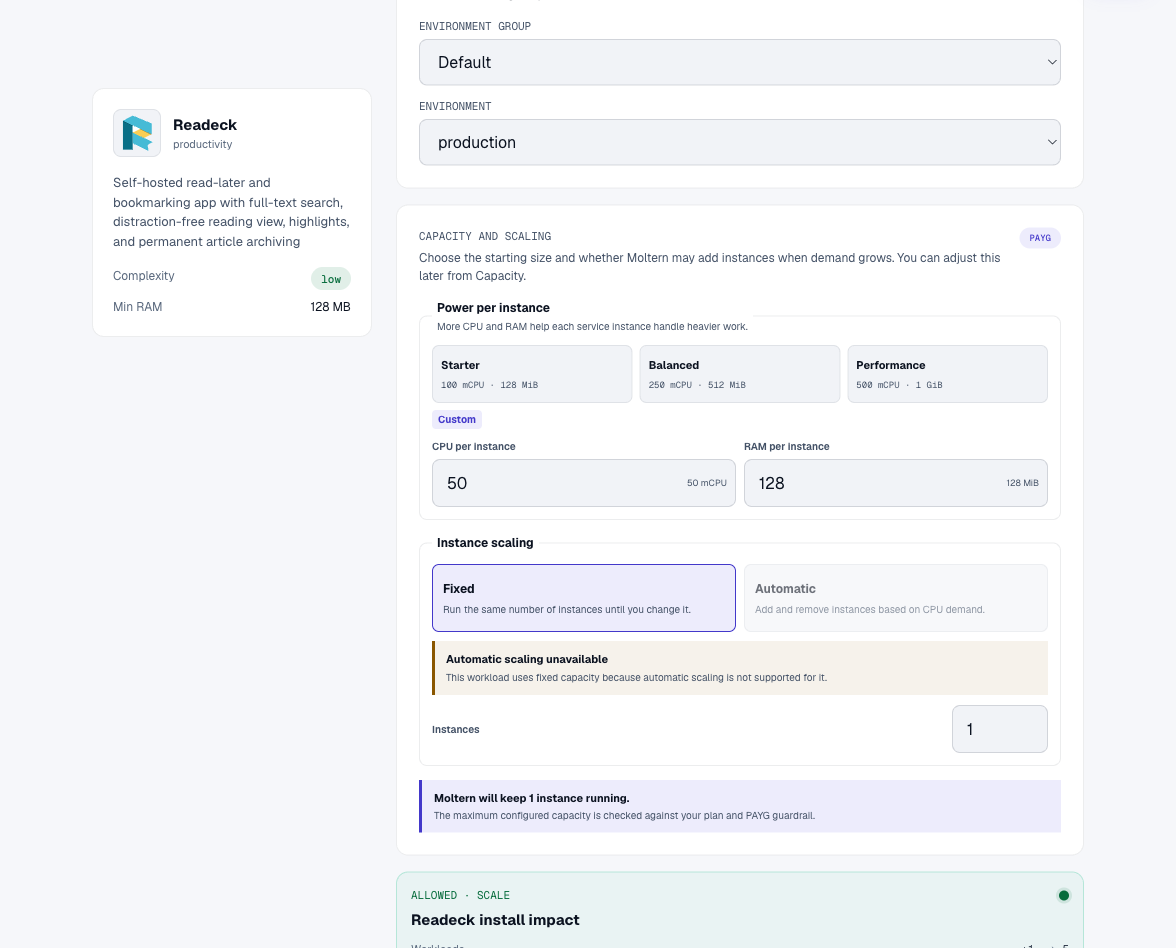
Zero dedicated-storage impact does not mean saved content consumes no storage. Articles and their assets occupy this service's workspace filespace allocation.
Create The Owner
The first visit asks for an owner username and strong password, with an optional email field. Complete Finish installation before sharing the URL. The account belongs to Readeck, not Moltern. A password created in this wizard is not automatically recoverable through Moltern's protected connection details.
Store the password securely. Adding an email does not configure email delivery or prove that password reset works. Verify a recovery method before relying on the service for irreplaceable material.
Save And Read An Article
- Paste a public article URL into the bookmark form and choose Save link.
- Wait for extraction to finish.
- Open the bookmark and check Bookmark content.
- Confirm the title, readable text and source domain match the original.
- Reload and read the existing saved article without submitting it again.
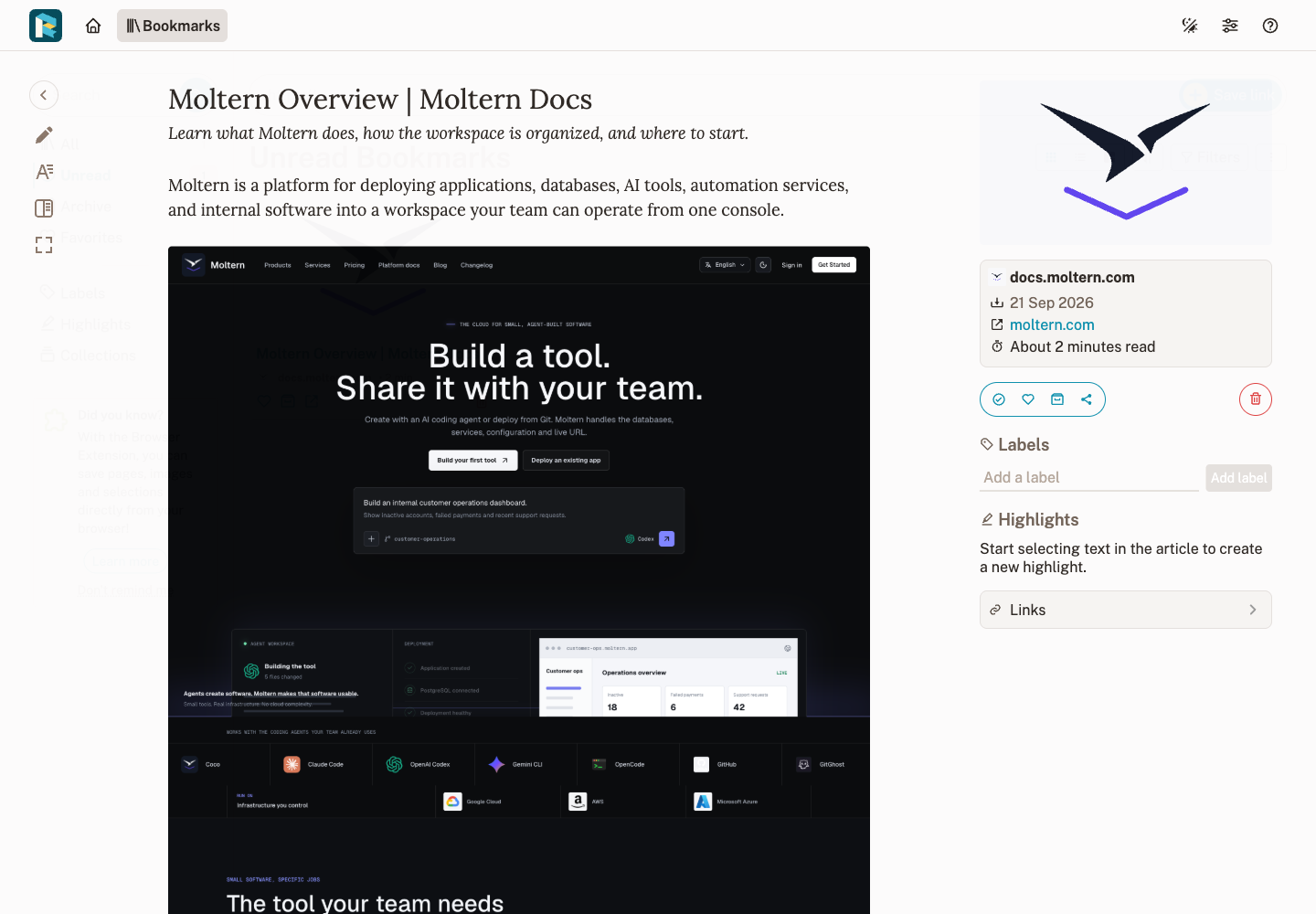
Labels organize topics, favorites identify useful references, and archiving keeps read items without deleting them. Export and Share offers content export; inspect downloaded output before relying on it elsewhere. An article export is not necessarily a backup of every account, label and asset.
Access And Integrations
Sign-in controls access to the library. Check the URL in a signed-out browser before storing private material. Knowing the URL does not give an agent access to your account. Store integration tokens in secret settings, never repositories, URLs or screenshots.
A Moltern private-service attachment controls connectivity; Readeck credentials control application authorization. Both may be needed. Agent attachment and revocation remain an open validation gate for this service.
Public article downloads are allowed without blanket private-network access. Do not use internal database addresses or infrastructure metadata as extraction targets. Pages requiring browser cookies, blocking automated readers or using unsupported formats may not extract correctly.
Persistence, Capacity And Recovery
The tested article remained readable after runtime replacement. This establishes orderly restart readback, not crash consistency or backup restoration. Keep an independent export and validate restoration before making this your only copy.
Use Moltern Capacity to adjust CPU and memory and Live Logs to investigate startup. Replacement can briefly interrupt the URL. Wait for readiness before diagnosing data loss. Do not overwrite database files or change database paths on a populated library as a troubleshooting shortcut.
Billing > Storage by workload shows periodic measurements. Small collections can round to zero GiB. Reserved dedicated capacity and measured shared-file bytes are different figures. Exact billing lifecycle reconciliation is tracked separately from article persistence.
Troubleshooting
| Symptom | Next action |
|---|---|
| Untitled bookmark or extraction error | Open the failed bookmark, check Live Logs, and test a known public article. |
| Every public page times out | Older installs may lack the corrected download rule. Contact support with the service ID before recreating a populated library. |
| Healthy service, empty content | Startup checks do not test extraction. Inspect the saved article body. |
| 503 immediately after restart | Allow startup to finish, then reload the same bookmark. |
| Works in your browser only | Browser cookies or network access may differ. Never paste session tokens into the bookmark URL. |
| Forgotten password | Use a configured recovery method or contact your administrator; do not delete the library. |
Delete Or Retain The Library
Export material you need. Open the Moltern service overview, choose Delete Service, review the scope and select Delete stored data or Keep workspace files. Complete account confirmation when requested. Kept files still consume storage; removing the runtime alone does not reclaim them.
Wait for cleanup before assuming the space is free. Never delete the whole shared workspace allocation as a workaround for one service. Cleanup must affect only the selected service's data.
Frequently Asked Questions
Does Readeck need a separate database?
Not in this tested configuration. It uses an embedded database without a separate database provisioning step.
Does saving a URL guarantee a complete offline copy?
No. Open the article and verify its contents. Restricted or dynamic pages may produce incomplete extraction.
Can a coding agent use the library just by knowing its URL?
No. Connectivity is not authorization. Configure the intended application credentials and scoped access, then test the required operation.
Does surviving a restart mean the library is backed up?
No. A backup must be independent and restoration tested. Current evidence covers orderly runtime replacement and article readback.