Deploy a service
Services add databases, content platforms, developer tools and other supporting software to your workspace. Each service has its own configuration and setup requirements. Use its guide alongside the options shown in Moltern.
The complete workflow is choose, configure, preview, deploy, use, verify and operate. A Running badge confirms the runtime is ready; your service is useful only when you can finish setup, authenticate and complete the task you installed it for.
Before you start
You need access to a workspace and permission to create services. Check your workspace capacity and plan before deploying. Dependencies count toward resource usage too. Do not share your Moltern account password with an installed service.
Decide which data the service will hold and whether you can recreate it. Use an environment with disposable data for your first test. Check that the service guide supports the operation you need, including any database, outbound network, external account, or recovery requirements.
| Decision | Why it matters |
|---|---|
| Workspace | Determines ownership, permissions, plan and usage |
| Environment | Selects related workloads and available private connections |
| Service template | Determines setup, runtime and supported options |
| Dependencies | May add separate workloads, credentials and stored data |
| Capacity | Must cover the parent service and every new dependency |
| Recovery | Must be verified before storing data you cannot recreate |
If a guide marks a configuration as unverified or unavailable, do not interpret its presence in the documentation as a production recommendation.
Choose and configure
- Open Services in Moltern and select a service from the catalog.
- Choose a name and environment. Environments keep related workloads organized.
- Complete the configuration shown by the template, including any initial administrator email and password. Use an address that you control.
- Review required dependencies. Create a new dependency or select a compatible existing service when that option is available. Do not reuse a database without considering its existing data and permissions.
- Review Capacity and scaling for the service and its dependencies.
- Select Preview deploy, review the impact, then Confirm deploy.
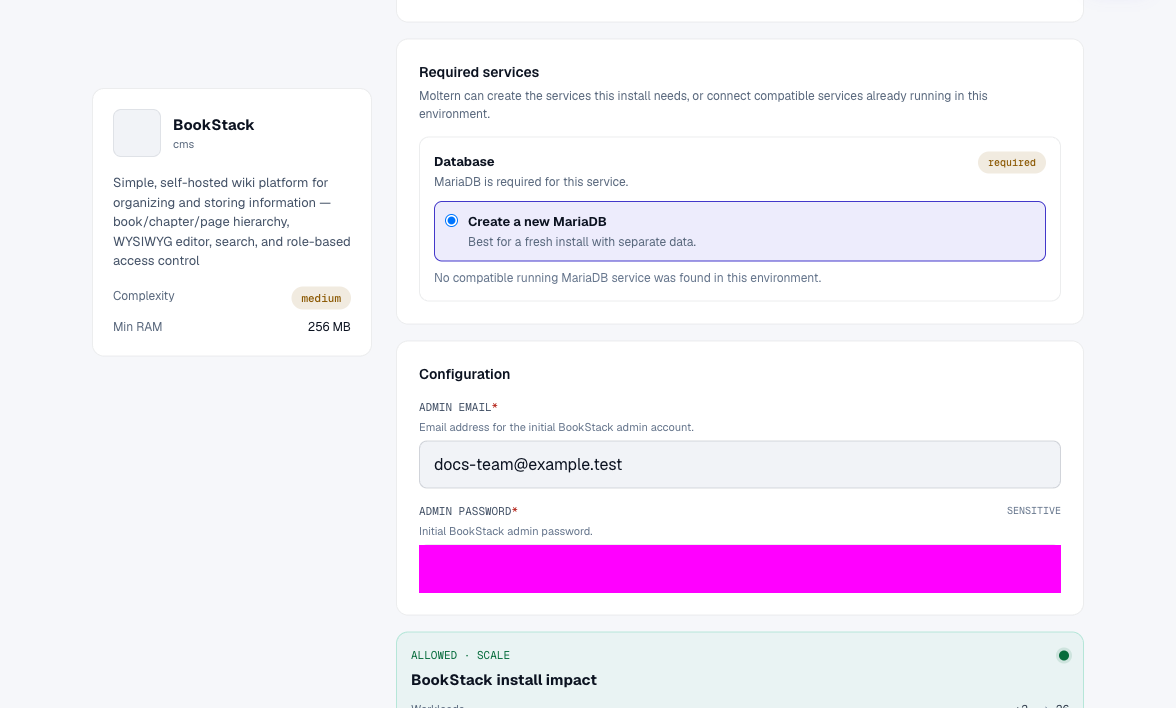
Understand Dependencies Before Deploying
A service may need another service to run. For example, a publishing tool can store uploaded files itself but keep its pages and users in a database. Keeping the uploaded files while deleting the database will not preserve the whole site.
Create A New Dependency
Choose this when you want a separate instance for the parent or do not have a compatible one. Review its capacity and storage impact in the deployment preview. Wait for its setup to finish before expecting the parent to connect successfully.
An automatically created dependency is managed through its parent service's lifecycle. Read deletion choices for the full service tree; do not assume the dependency will always survive removal of its parent.
Reuse An Existing Dependency
When the template offers a compatible existing service, select it in the same environment. Check its available capacity and whether its existing data or users can safely be shared. Reuse is not an automatic guarantee of a separate database, schema, user account or permission boundary for the new client.
A separately created database may serve several clients. Removing one client does not make that database disposable. Keep a record of consumers and do not delete or reset it to troubleshoot a single application's login problem.
Connect A Workload After Deployment
Private service connections and installation dependencies are related but not identical. A template dependency can be needed to start the service at all; a private attachment can give an already deployed client access to another service.
In a supported development service, use Settings > Private service connections to select the target. Applications and coding agents have their own connection controls. Grant only connections each workload needs, then verify an actual application operation with authenticated credentials.
Current limitation: adding another connection to an existing development service can update the saved configuration while its running process retains old variables. Opening another terminal does not always fix it. Save work and plan a client stop/start if needed; see the Redis and MongoDB troubleshooting sections.
Finish setup
Wait for deployment to finish and review the logs if a step fails. When a web service is ready, use Open to visit it and complete the setup described in its guide. Private databases and terminal-based tools do not necessarily have public web pages.
For example, BookStack needs a successful login and a saved page; Uptime Kuma needs an account and a working monitor. Running status alone does not prove these actions work.
Prove The Service Works
Use an operation that matches the product:
| Service type | Useful first check |
|---|---|
| CMS or wiki | Sign in, create a draft or private page, save it, then reopen it |
| Database | Connect an authenticated client, write one test record and read it back |
| File service | Upload a non-sensitive file, download it and check its contents |
| Automation | Run a harmless test workflow and inspect its actual result |
| Developer tool | Create or modify a test project and reopen the saved work |
| Browser-only utility | Process test input and verify output; check whether saving is browser-local |
Do not use customer data, live payments or outbound messages to real recipients for a first test. A screenshot of a healthy status is not a substitute for a saved artifact or successful authenticated query.
For a persistent service, repeat a read-only check after a planned stop/start. Do not recreate the test item first: that could conceal lost data. If the service depends on a database, validate the parent and database independently. Restart survival does not establish backup, disaster recovery or zero-downtime behavior.
Credentials and connections
Use service Settings > Connection Details for available connection values. They stay masked until you complete the protected reveal flow. Keep secrets out of screenshots, source code and shared chat. Network access alone does not grant permission inside the installed product.
See platform service guidance for attaching workloads and granting only the access they need.
An installed service's administrator account is different from your Moltern account. Managed connection values may be available in Settings, while accounts you create inside the service are managed by that service. Its own password-reset email flow may require email configuration; Moltern's account emails do not configure every installed product.
Keep injected credentials server-side. Share a variable's name, not its value. A public application URL grants neither database authentication nor administrative rights to an agent.
Storage, Capacity And Billing
Treat these as separate questions:
- Where is durable data? Consult the guide for application files, database data and browser-local state. Some services have several data components.
- How much is used? Inspect the latest workload measurement in Billing. Measurements can lag a write; small values may round to zero in GiB.
- What capacity is allowed? Review the plan, capacity settings and the new deployment's complete impact, including dependencies.
- What will a change cost? Use the displayed plan and PAYG terms. Unknown or shadow measurements are not a verified invoice.
Persistent services use an isolated portion of workspace storage where supported. This does not mean every service can browse every other service's files. Shared storage is not automatically compatible with every database engine. Follow service-specific durability warnings rather than assuming all engines have the same requirements.
Older services can require a planned storage migration. If Moltern stops an update to protect existing data, contact support. Do not delete old data, switch templates or recreate the service to bypass the warning.
In Capacity, review CPU, memory and supported scaling options. A resize can replace a runtime and interrupt a single-instance service. Automatic scaling appears only for supported workloads; multiple database processes do not automatically become a coordinated cluster. Review dependency capacity separately.
When a plan allowance is exceeded, remove only unused workloads and data, or review Billing for a paid plan and available PAYG options. A payment method or increased spending allowance does not repair a failed database or remove the need to size the workload correctly.
Operate and remove
Review logs, capacity and billing in Moltern. A restart can interrupt stateful services; it is not a backup. Before deleting a service, export important data, review the dependency/data choices in the confirmation, and wait for cleanup to complete. A deleted workload's data may not be recoverable.
Troubleshooting
| Symptom | Safe next action |
|---|---|
| Waiting for a dependency | Check the dependency's logs; resolve its failure before retrying the parent |
| Running but setup fails | Check required configuration and perform an authenticated operation |
| No public URL | Check whether it is a private database or terminal service |
| Private connection times out | Check environment, target health, attachment and private endpoint |
| Authentication fails | Use current protected credentials; do not erase storage or expose a public database port |
| New variable is missing | Check its scoped name and the client-refresh limitation above |
| Permission denied on stored files | Preserve data and report the service/time; do not recursively loosen permissions |
| Storage migration required | Arrange a verified migration; an empty replacement is not recovery |
| Usage is zero or unknown | Check units and last measurement, then report missing collection |
| Delete is still processing | Wait for cleanup; do not redeploy to clear a status message |
For support, include the service identifier, template, action, timestamp and a sanitized error. Exclude passwords, tokens, connection strings and private customer content from screenshots and logs.
Frequently Asked Questions
Does Deploying A Database Give Me A Public Website?
No. A database usually provides a private protocol endpoint for attached clients. A web database client is a separate service with its own authentication and access requirements.
Can I Use One Database For Several Services?
Only when each template supports that database and the connection is offered. Compatibility does not imply separate users, data or capacity. Review actual permissions and lifecycle before reuse.
Does Clone Copy All My Service Data?
Do not assume so. Configuration cloning and data backup/restore are different operations. Read the clone dialog and service guide, then verify the destination before switching traffic or deleting the original.
Are Backups Included For Every Service?
No blanket guarantee is made here. Verify backup and restore for the exact deployment. A restart that preserves data is useful evidence, not an independent backup.
Which Documentation Should I Use?
These guides cover installing and using catalog software. Platform docs cover Moltern workspaces, permissions, applications, agents and operational controls. Upstream docs describe capabilities that may require settings or infrastructure not enabled by the Moltern template.
Next Steps
- Redis: private clients and persistence
- MongoDB: document operations and current limits
- BookStack: a knowledge base and its database
Read platform documentation for workspace settings and browse service guides for product setup.