Redis
Redis stores keys and values for application caches, queues and short-lived data. On Moltern, connect to it from an explicitly attached workload, not a public browser URL.
Use Redis when your application needs fast cache lookups or a Redis-compatible queue. It is not a replacement for an application's durable system of record. This guide takes you from deployment to a successful client operation, then explains how to check persistence and remove a disposable instance safely.
Before You Start
- Select the workspace and environment that should own the database. Your role must allow creating services and updating the workload that will connect.
- Have a server-side application or development service available as a client. A browser cannot connect directly to the private Redis endpoint.
- Review your workspace's available capacity. Redis and the client are separate workloads; both contribute to usage.
- Use non-sensitive test data first. Do not begin with customer sessions or a production queue whose loss would stop your business.
What This Template Provides
| Area | Current behavior |
|---|---|
| Access | Private Redis endpoint with password authentication |
| Dependencies | No separate database dependency for Redis itself |
| Connections | Explicitly attach an application or supported development service |
| Data | Persistent data directory; the tested configuration enables append-only persistence |
| Availability | Single instance, not a tested clustered or failover deployment |
| Encryption | The tested database connection is redis://, not rediss:// |
The screenshots show real disposable Moltern deployments. Names and capacity values are examples, not defaults that every workspace should copy.
Deploy
- Open Services, find Redis, and select Deploy.
- Choose the same environment as the application or development service that will use it. Give it a recognizable name.
- Review CPU, memory and storage in Preview deploy, then confirm.
- Wait for the service to become Running.
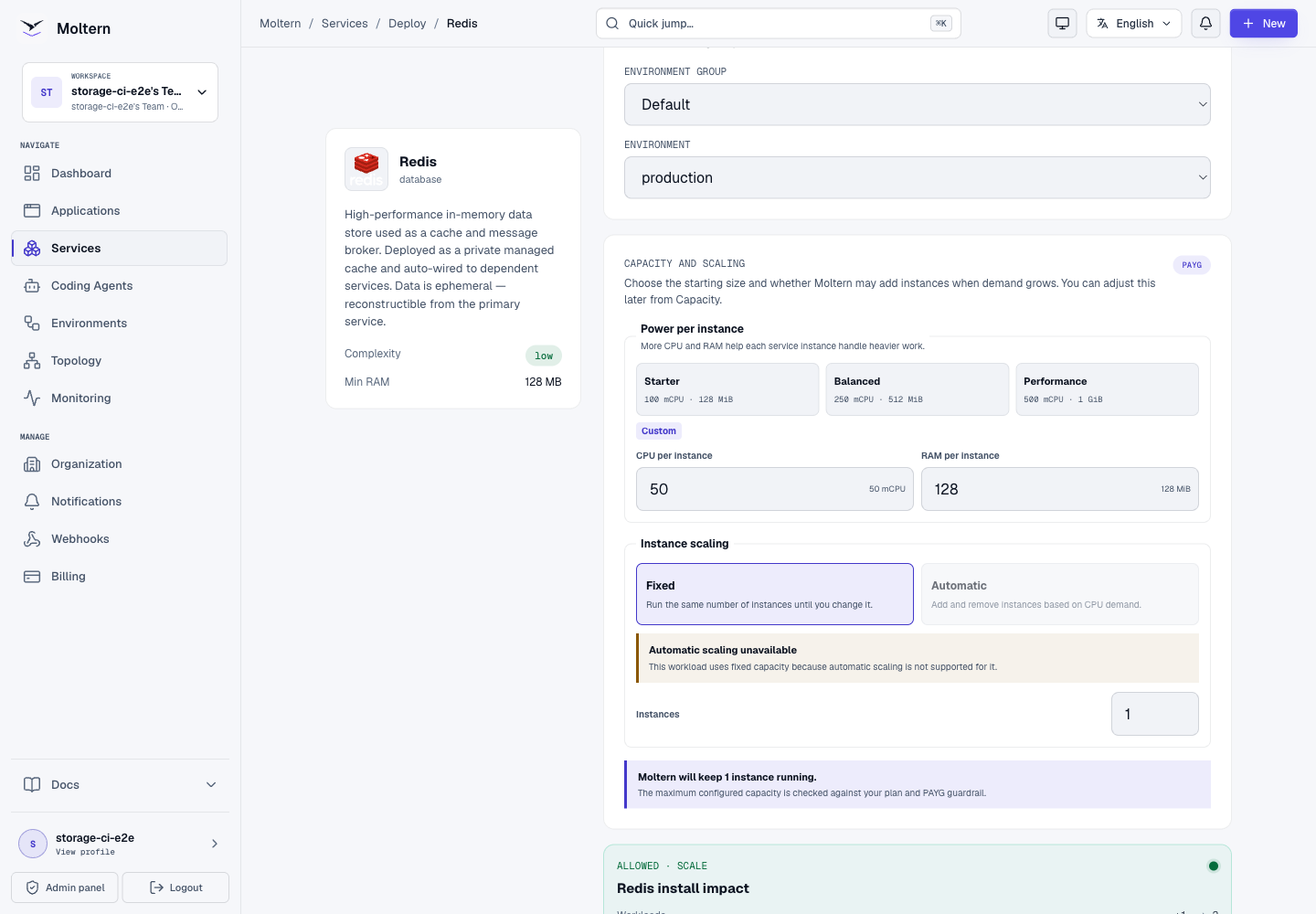
Start with capacity appropriate to your data and workload. The small validation instance in the screenshot is not a production sizing recommendation.
Expected result: Redis appears in your service list as Running. The absence of a public Open URL is normal for this private database. Running is the starting point; complete the write/read check below before using it in your app.
Create Redis Or Reuse An Existing Instance?
When another service's deployment form offers Redis as a dependency, choose a new instance for separate data and lifecycle, or select a compatible existing instance in the same environment when reuse is offered. Do not create a second Redis merely because an existing one has no public URL.
Reusing an instance also shares its capacity and database credentials with the connected workload. Use distinct application key prefixes, and review whether applications may affect each other's keys. An attachment is not a separate Redis user, key-space permission boundary, or dedicated memory allowance.
Connect A Workload
For a development service, open its Settings > Private service connections, select Redis and choose Connect. Wait for the service update to finish and open a fresh terminal session. Application connections are managed from the application's private service connection controls.
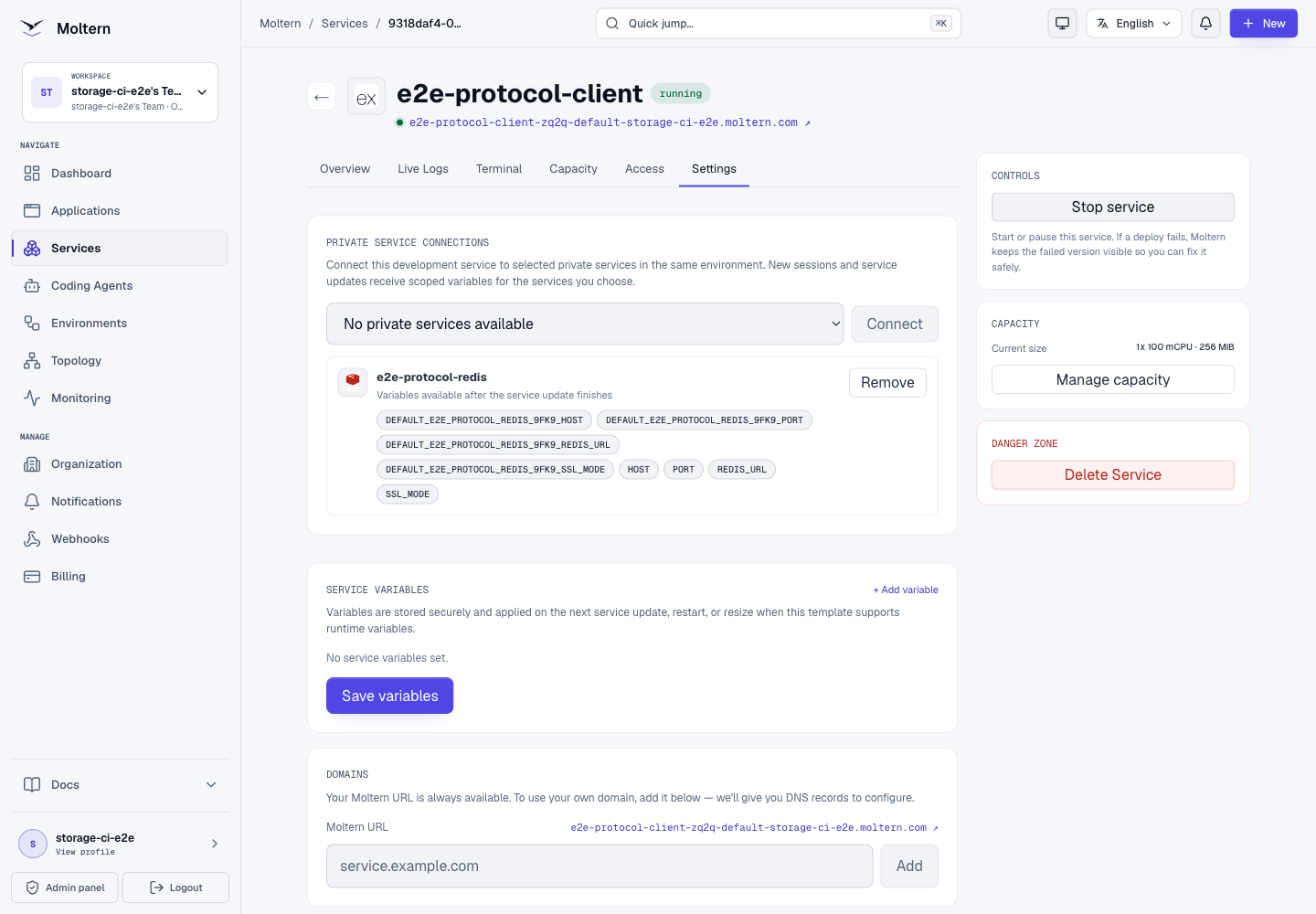
Use the scoped connection variable listed on the attachment. Its name depends
on the environment and service name. Do not assume a generic REDIS_URL exists
or points to the intended service when multiple services are attached.
For a client that needs separate fields, open Redis Settings > Connection details. Complete account confirmation when requested and use your connection-details password to reveal the private host, port and credentials. Keep these values out of screenshots, source control and browser-side code.
Connection Values Explained
| Value | How to use it |
|---|---|
Scoped REDIS_URL | Preferred input for a compatible server-side client; includes the selected service's connection values |
| Host and port | Use when your client takes individual connection fields; do not use a public website URL |
| Password | Reveal only for a trusted client that cannot use the injected variable |
Generic REDIS_URL | Do not assume it selects the right instance when several services are attached |
Never put Redis credentials in variables exposed to frontend JavaScript. Do not paste an entire connection string into a support ticket. For diagnosis, report the service name, time, operation and sanitized error instead.
Write And Read A Test Value
In a disposable Node.js client project with the official redis package installed,
use the attachment's connection variable. Replace the placeholder name below
with the variable shown in your own Settings:
The redis dependency must be present in the client project. For an application,
declare it in the project dependencies and deploy that change. For a disposable
development client, install it in that project before running the example.
import { createClient } from 'redis';

const client = createClient({
  url: process.env.YOUR_SCOPED_REDIS_URL,
  socket: { connectTimeout: 4000, reconnectStrategy: false },
});
client.on('error', () => console.error('Redis connection failed'));
try {
  await client.connect();
  await client.set('validation:note', 'Saved from my application');
  console.log(await client.get('validation:note'));
} finally {
  if (client.isOpen) client.destroy();
}
Do not replace the private host with localhost. Redis is a separate service.
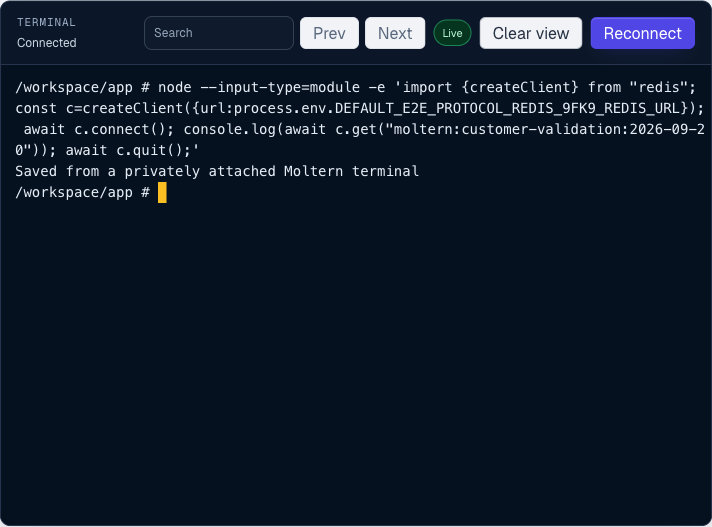
Expected result: Saved from my application appears. This proves the client
reached the selected Redis and could authenticate, write and read. A connection
timeout or authentication error is not a successful test, even if Moltern shows
the Redis process as Running.
The example creates one demonstration key. Use an application-specific prefix
in real projects and remove only the keys you created for testing. Do not use
FLUSHALL or FLUSHDB to clean a shared database.
Check Persistence After Restart
Use a disposable instance for this check, or schedule a maintenance window:
- Write the example value and confirm it can be read.
- Save any work in the client and use Redis's Stop service control.
- Start Redis again and wait for Running. Clients may need to reconnect.
- Run a read-only lookup of
validation:note. Do not run the write again before the check, or you will hide a persistence failure. - Confirm that the original value is returned.
In the JavaScript example, omit client.set(...) for the read-only check. The
screenshot above was captured after replacing the database runtime and reading
the previously saved value.
Persistence And Security
The tested configuration enabled persistence and returned the original key after Redis was stopped and started with a replacement runtime. This is not a backup, high-availability, failover or disaster-recovery guarantee. Keep another source of truth for critical data until your recovery requirements are verified.
The tested connection uses password-authenticated redis:// on a private network.
It is not a TLS-enabled rediss:// connection. HTTPS on your application's public
URL does not add TLS to its Redis connection.
Removing the private connection blocked a fresh connection in the tested flow. Removal is not a promise to rotate the password or terminate every previously established connection immediately.
Backups And Recovery
Restart survival and backups solve different problems. AOF persistence does not give you an independent copy after accidental deletion, storage loss, or a bad application write. A recovery plan needs an export or snapshot appropriate to your Redis version, a copy outside the affected instance, and a restore test.
This guide does not claim a verified one-click Redis backup or restore workflow in Moltern. Ask your platform administrator to validate the recovery procedure before treating Redis as critical durable storage. For a rebuildable cache, document how the application repopulates it from its source of truth.
See Redis persistence documentation for the distinction between AOF and RDB snapshots. Do not copy a live data directory and assume that it is a consistent backup.
Capacity, Logs And Usage
Review Capacity before changing CPU or memory. Redis primarily serves data from memory, so free storage does not mean there is enough runtime memory. Allow headroom for the process and persistence activity, not only the raw size of your keys. Validate your application's own latency and error rate under load.
Capacity changes and restarts can interrupt a single-instance database. Schedule them and confirm that clients reconnect. Do not assume increasing the replica count creates Redis Cluster, Sentinel, or failover; those are different database configurations, not features established by this test.
Use Live Logs to investigate startup or persistence errors. In Billing, review the Redis workload separately from connected applications. Storage usage can lag the latest write until the next measurement, and small datasets may round to zero in a GiB display. Neither a rounded zero nor an unknown measurement proves there is no data. If it stays unknown, contact support with the service identifier and measurement time, without sharing connection credentials.
The selected tests verified positive storage measurements and resource allocations. They did not establish final invoice accuracy or every PAYG proration case; follow your workspace's displayed billing status.
Troubleshooting And Cleanup
Connection times out: check that Redis is running, both workloads use the same environment, and the attachment update has completed.
Wrong password: use the current connection details or injected variable; do not paste credentials into terminal commands that will be saved in history.
Variable missing after connection: wait for the workload update and start a new session. Use the exact scoped variable name shown in Settings. In the current development-service flow, adding another connection can leave the running process with its old variables even after the update reports success. Save your work, then stop and start the client service before retrying. This interrupts the client; do not do it during production traffic without planning.
Delete disposable services through Moltern and review the stored-data choice. Deleting a client does not imply that its separately created Redis database should be deleted too.
Safe Removal Checklist
- Identify every application, agent and service that still uses this Redis.
- Move clients to a replacement or confirm the data can be discarded.
- Remove their private connections and verify the clients handle the change.
- Delete Redis through Moltern, explicitly reviewing the stored-data option.
- Wait for cleanup and review subsequent usage measurements. Do not repeatedly create replacements while the original deletion is still being processed.
Automatically provisioned dependencies belong to their parent service's lifecycle. Read the parent's deletion confirmation before proceeding; a separately created, reused Redis should not be treated as disposable just because one client is gone.
Frequently Asked Questions
Why Can't I Open Redis In My Browser?
Redis uses its own database protocol on a private endpoint. Open your application or a compatible client, not the database hostname as an HTTPS website.
Does An Application's HTTPS Certificate Encrypt Redis Traffic?
No. HTTPS terminates the public web connection. The tested Redis connection is
password-authenticated but not database TLS. Do not describe it as rediss://
unless that database configuration has actually been enabled and verified.
Can A Coding Agent Use Redis?
Only grant access when the agent needs it, through the agent's supported connection controls. A public URL alone does not supply authentication. This guide's protocol evidence comes from a development-service client; it is not a claim that every coding-agent integration has been retested.
Is Removing A Connection The Same As Rotating A Password?
No. Removing an attachment removes that connection configuration and access rule; do not assume it revokes a copied password or all established sessions. Review credential rotation separately when a password might have been exposed.