MongoDB
MongoDB stores documents that applications can query and update through a database driver. This guide covers a disposable, private Moltern test deployment.
Authenticated operations and a stop/start persistence check passed. That does not certify the current shared filespace for production MongoDB durability. Confirm a supported storage and recovery configuration with your platform administrator before storing important data.
Before You Start
You need a workspace role that can create services and change the client workload's connections. Choose a disposable environment and use non-sensitive documents. The client must run inside a workload that can be privately attached to MongoDB; a browser or your laptop does not gain access just because you know the database hostname.
Prepare enough capacity for both the MongoDB instance and its client. The small instance shown here is a functional test, not a production sizing recommendation. Review the warning above before choosing this configuration for data that cannot be recreated.
What This Template Provides
| Area | Current behavior |
|---|---|
| Model | A single MongoDB instance for document reads and writes |
| Dependencies | No separate database service required by MongoDB itself |
| Access | Private endpoint, reached by an attached client |
| Authentication | Generated credentials; the supplied account has administrative privileges |
| Persistence | Original document survived a tested stop/start runtime replacement |
| Not certified | Production storage durability, replica sets, failover, database TLS, backup and restore |
An application may support only a particular MongoDB version or require a replica set for some features. Check its requirements before selecting a standalone instance; successful basic reads do not establish compatibility with every MongoDB-based product.
Deploy A Test Instance
- Open Services, find MongoDB, and choose Deploy.
- Select the same environment as the workload that will connect to it.
- Review capacity and storage in Preview deploy, then confirm.
- Wait for Running before connecting. Check Live Logs if startup fails.
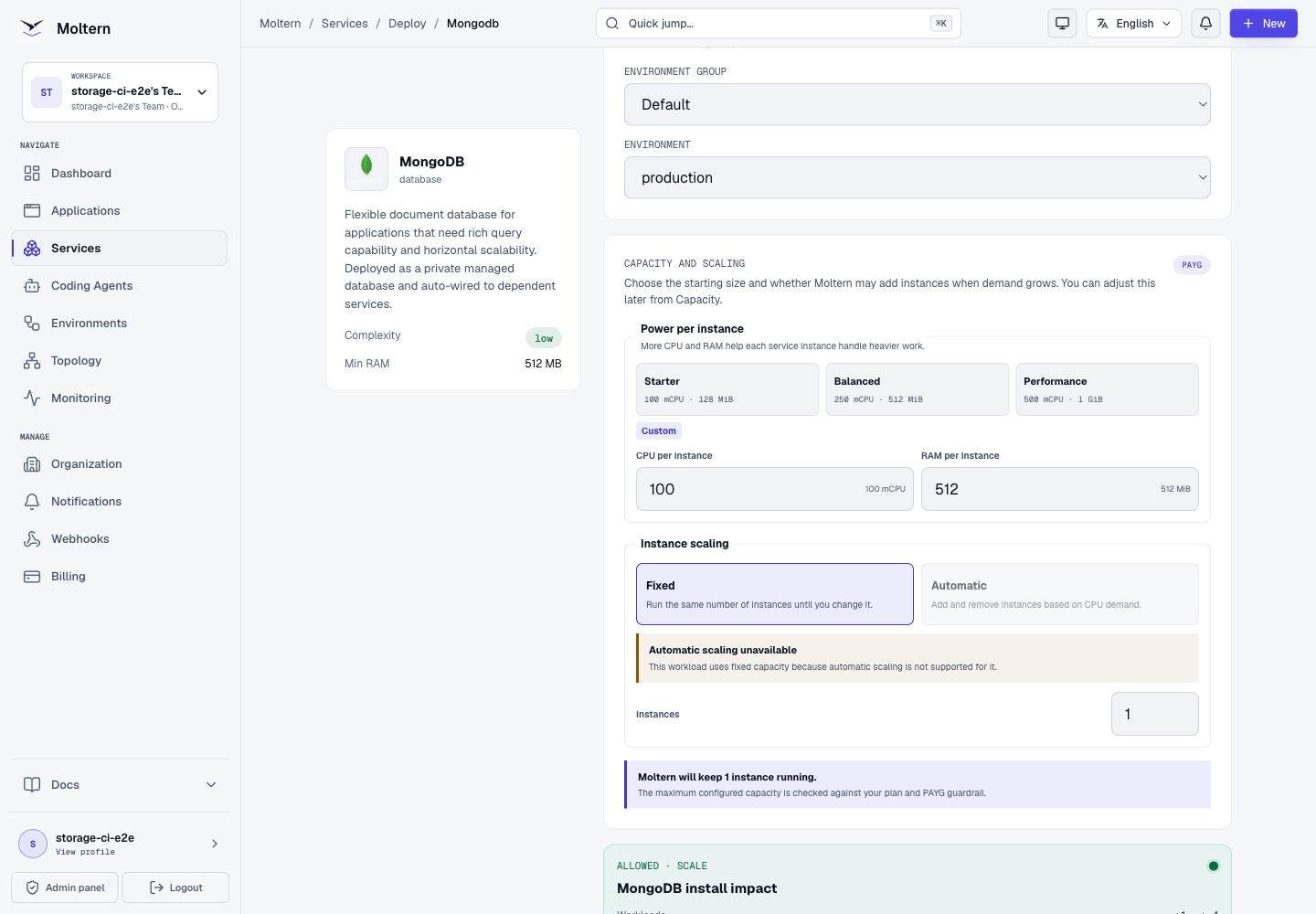
The tested first initialization required one automatic restart after a listener error. A later stop/start succeeded without a container restart. Repeated startup failures need investigation; do not assume they are always harmless.
Expected result: MongoDB reaches Running and a connected client can complete the write/read check below. There is no public MongoDB website to open.
If a parent service offers a MongoDB dependency, review whether it will create a new instance or reuse a compatible existing one. Reuse shares database capacity and credentials; it does not automatically isolate application users or create a separate database with restricted permissions. Do not reuse an important instance merely to bypass a storage allowance.
Attach A Client
In a development service, open Settings > Private service connections, select MongoDB and choose Connect. Wait for the update to complete and start a fresh terminal session.
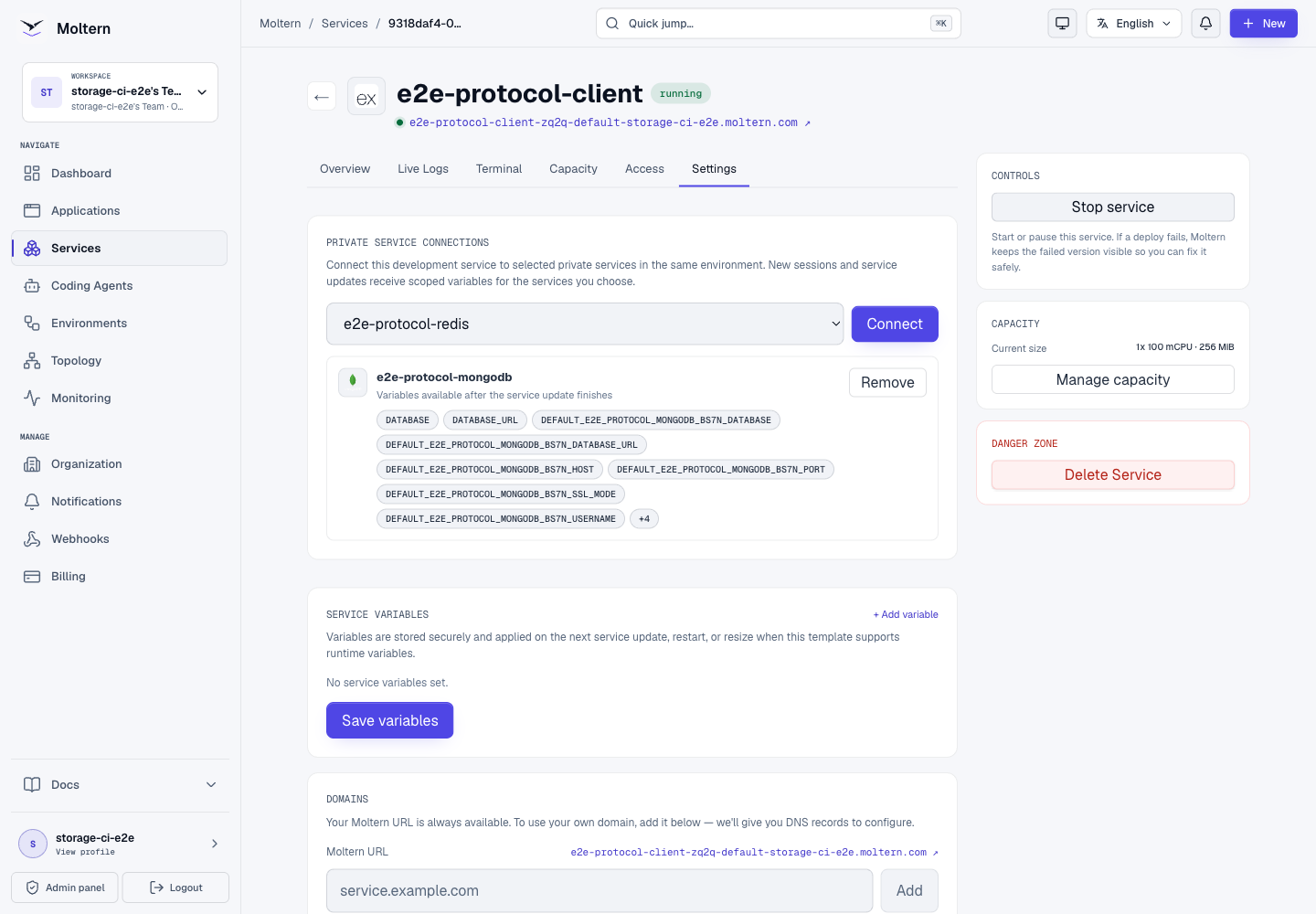
Use the scoped DATABASE_URL variable shown on the attachment. The exact prefix
depends on your service name. Keep the supplied authSource parameter; changing
the authentication database can cause authentication to fail.
MongoDB has no public browser URL in this configuration. For separate connection fields, open MongoDB Settings > Connection details and complete the protected reveal flow. Never publish the password or connection string.
The generated connection uses an administrative database account. Attaching a workload grants access with that account; it does not automatically create a restricted per-application MongoDB user. Review those privileges before granting access to an application or coding agent.
Understand The Connection String
| Part | Meaning |
|---|---|
mongodb:// | Native MongoDB driver connection, not a browser URL |
| User and password | Authentication material; keep the full URL secret |
| Host and port | Private endpoint of the selected MongoDB service |
| Database | Default application database used by the client |
authSource=admin | Database used to authenticate the supplied account; it need not be the application database |
Use the exact scoped variable shown for your selected instance. A generic
DATABASE_URL may be missing or refer to another attached database. Do not
replace the private host with localhost, and do not remove the authentication
parameters when copying configuration into a compatible client.
Keep MongoDB access in server-side code. A browser-exposed variable, client bundle, Git commit or terminal transcript is not a safe place for the connection string. When reporting a failure, provide the timestamp and sanitized error type rather than the full driver error if it contains credentials.
Write And Read A Document
In a disposable Node.js project with the official mongodb driver installed,
replace the environment variable placeholder with the scoped variable from your
attachment:
Declare mongodb as a project dependency before deploying an application, or
install it in your disposable development-client project. The code below uses
the default database supplied in the connection URL and writes a single test
document with a stable identifier.
import { MongoClient } from 'mongodb';

const client = new MongoClient(process.env.YOUR_SCOPED_DATABASE_URL, {
  serverSelectionTimeoutMS: 4000,
});
try {
  await client.connect();
  const notes = client.db().collection('validation_notes');
  await notes.replaceOne(
    { _id: 'first-note' },
    { _id: 'first-note', value: 'Saved from my application' },
    { upsert: true },
  );
  console.log((await notes.findOne({ _id: 'first-note' })).value);
} finally {
  await client.close();
}
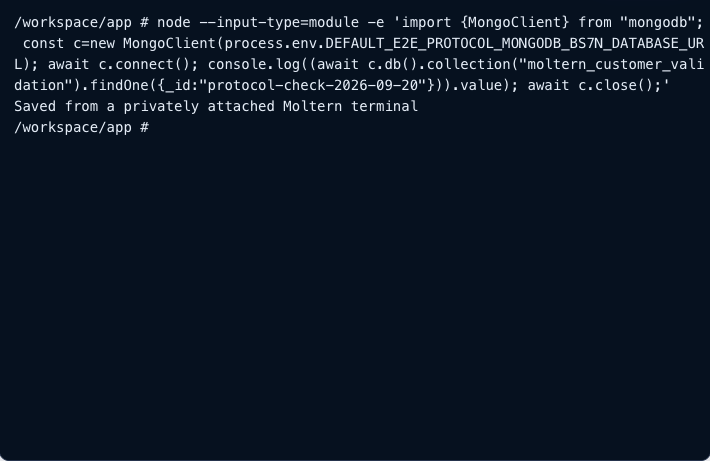
Expected result: Saved from my application. Run it a second time to check
that the same _id is updated rather than creating a new document on each run.
For your own application, use a collection name and schema appropriate to its
data; do not mix testing documents into customer collections.
Verify Persistence
Use a disposable instance or an agreed maintenance window:
- Complete the write/read example and note its document identifier.
- Use MongoDB's Stop service control and wait for it to stop.
- Start MongoDB again and wait for Running.
- Connect from the client and read the same document without running
replaceOne(...)again. - Check that the original value remains available.
For a read-only check, keep the findOne(...) call and remove replaceOne(...)
from the example. Rewriting the document before reading would hide data loss.
Plan for failed connections during the restart and ensure the real application
can reconnect when its database returns.
What Was Verified
A real Moltern deployment, private service attachment, authenticated document write/read, incorrect-password rejection, and reading the original document after a replacement runtime. Credentials were consumed from the attached workload environment, not embedded in commands or screenshots.
This single-instance configuration does not promise replication, sharding, database TLS, automatic backups or zero-downtime changes. A private network is not the same as an encrypted database connection. Storage failures, restore procedures, load testing and billing reconciliation remain separate checks.
Why The Storage Warning Matters
A database can pass a simple query and still have unsuitable behavior during a power failure, concurrent writes, recovery, or storage interruptions. Moltern's functional test does not replace MongoDB's filesystem and durability requirements. Your platform administrator must verify those requirements against the deployed storage before approving production use.
See MongoDB production notes. Do not interpret a larger requested storage size, Running status, or a successful restart as certification of production durability.
Capacity, Logs And Usage
Use Capacity to review CPU and memory before a test. Include headroom for database indexes, connection handling and the application workload. Increasing disk capacity does not fix an out-of-memory problem, and increasing replicas does not turn this configuration into a replica set.
A single-instance capacity change may interrupt database access. Review the change, schedule it, and perform the same authenticated read afterward. Do not test an important capacity change by deleting and recreating the database.
Check Live Logs for startup, authentication, storage and listener errors. Repeated exits need investigation; capture their timing and non-secret error messages. Avoid pasting entire log archives containing application documents or connection URLs into public tickets.
In Billing, review MongoDB independently from its client. Database files include engine metadata and indexes, so their measured size will not match the text length of your documents. Measurements update asynchronously, and small values may round to zero in GiB. Report persistently unknown usage rather than assuming the database is free or empty. Final invoice and lifecycle-proration validation is separate from the protocol tests in this guide.
Backups And Recovery
A restart retaining a document is not a backup. Before important use, agree on what must be restored, how often copies are taken, where independent copies are kept, who can access them, and how a restore will be tested.
The workflow in this guide does not verify automatic MongoDB backups or restore. Do not make a recovery promise based on it. Use version-appropriate MongoDB backup tooling under your administrator's guidance and test restoration into a separate disposable destination, never by overwriting your only copy. If you cannot validate recovery and storage compatibility, keep this deployment limited to test data that you can recreate.
Troubleshooting And Cleanup
Authentication failed: use the current injected URL, including its authentication database, or reveal current connection details securely.
Timeout: verify the database is running, both workloads are in the same environment and the private attachment has finished updating.
Missing variable: wait for the update and open a new session. Use the exact scoped variable shown on the attachment. Adding another connection can leave the current development-service process with old variables. Save your work and stop/start the client before retrying; plan for that interruption. A new terminal alone does not refresh the running service's environment.
Delete disposable test instances through Moltern and review the stored-data choice. Do not delete a separately managed database just because a client no longer needs it.
Common Symptoms
| Symptom | What to check before retrying |
|---|---|
Authentication failed | Current credential, complete URL and authSource; do not reset storage |
| Server selection timeout | Running state, environment, attachment and private host |
| Connection refused during restart | Wait for startup and retry a fresh client connection |
| Newly added variable is absent | The client may still have its old runtime environment; use the planned stop/start workaround above |
| Document missing after restart | Ensure you selected the original service and database; stop writes and contact support before creating replacements |
| Listener conflict repeats | Collect sanitized startup errors and timing; a repeat is not a healthy startup |
| Usage remains unknown | Check the latest measurement and contact support; do not delete data to clear a reporting error |
Delete A Test Instance Safely
- Confirm that the instance contains only data you can discard, or verify an independent recovery copy first.
- Identify attached applications, services and agents. Move or stop their work.
- Remove the unneeded connection from each client.
- Delete MongoDB through Moltern and review the stored-data choice carefully.
- Wait for cleanup. Check the next usage measurement rather than assuming an old history entry means the deleted database is still running.
For a dependency created by a parent service, follow the parent's deletion flow. Do not delete a separately managed, reused database just because one application has been removed. Deletion is not a troubleshooting step for login failures.
Frequently Asked Questions
Does Attaching MongoDB Create An Application-Specific User?
No. The tested flow injects the managed administrative connection. Network attachment and database authorization are separate concerns. Restrict access to trusted workloads and validate a least-privilege database account strategy before using the configuration with sensitive data.
Can I Connect With A Desktop Database Client?
The supplied endpoint is private. This guide does not provide a public port or a desktop tunnel feature. Use a supported attached workload or ask your platform administrator for an approved access method; do not expose MongoDB publicly to make a connection test easier.
Can An Agent Use The Database?
An agent needs an explicitly granted connection and compatible client tooling. Knowing a website URL is not sufficient. This guide's write/read evidence is from a development-service client, not a certification of every agent provider.
Are Transactions And Automatic Failover Included?
Do not assume so. This tested single-instance deployment is not a verified replica-set or failover configuration. Check the application's requirements and the actual deployed database topology before depending on those features.