MySQL
MySQL is an open-source relational database commonly used by web applications, content systems, APIs, and business tools.
How MySQL Runs On Moltern
Moltern deploys MySQL as a private service. It does not receive a public website URL. Connection credentials are generated for the service and can be attached safely to applications and supported catalog services.
The deployment includes persistent database storage, health status, protected connection details, and capacity review.
Deploy MySQL
- Open Services and search for MySQL.
- Choose the environment that should own the data.
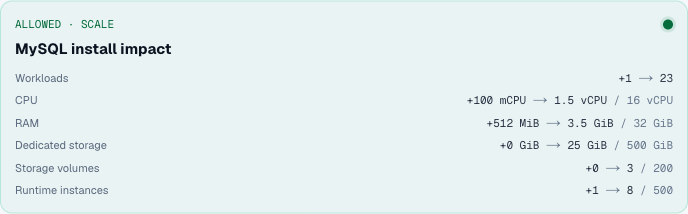
- Review the requested capacity and available storage.
- Start the deployment.
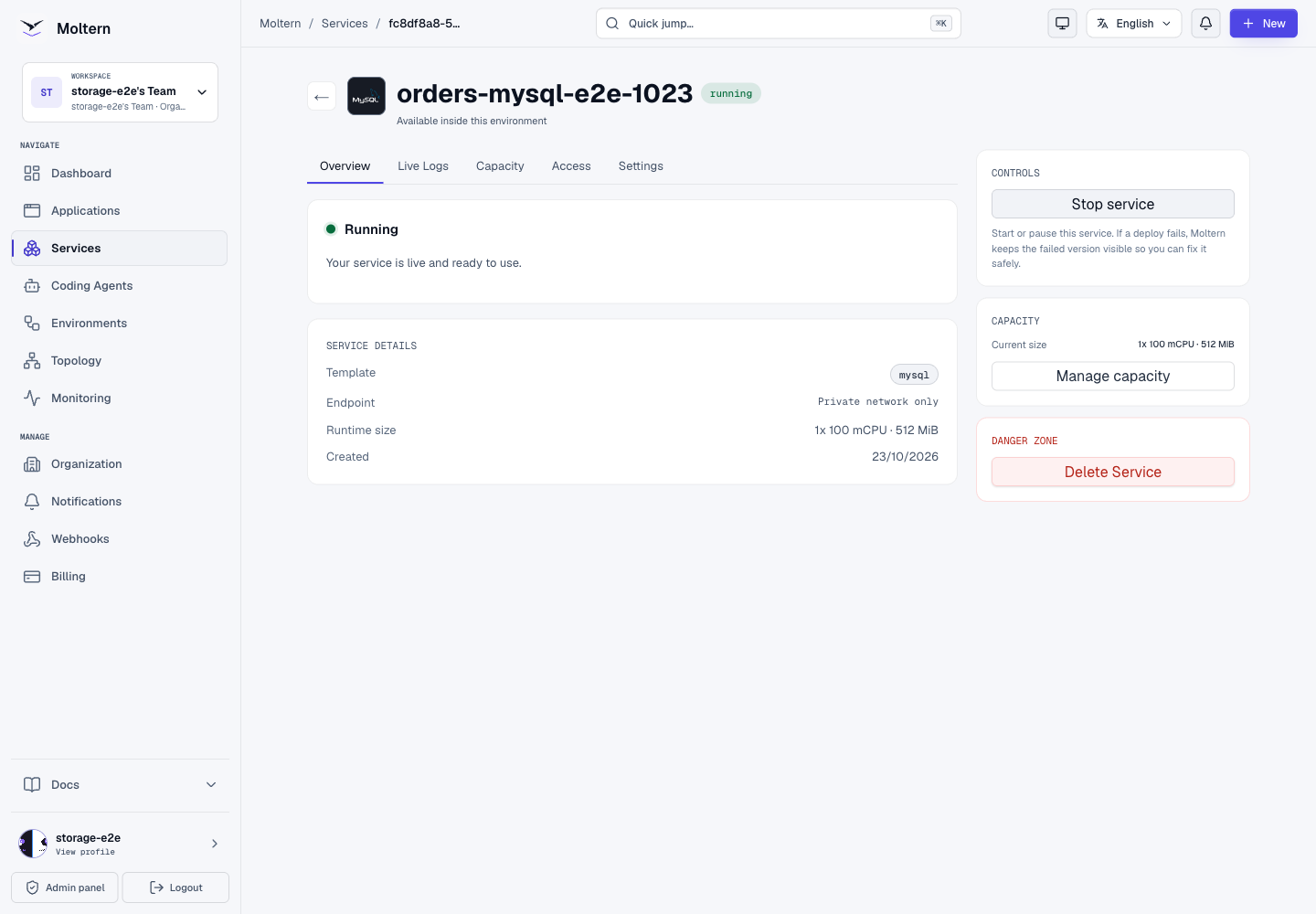
- Wait for Running before attaching a workload.
Connect A Workload
Open the consuming application or service and use Private service connections. Select this MySQL instance and apply the connection.
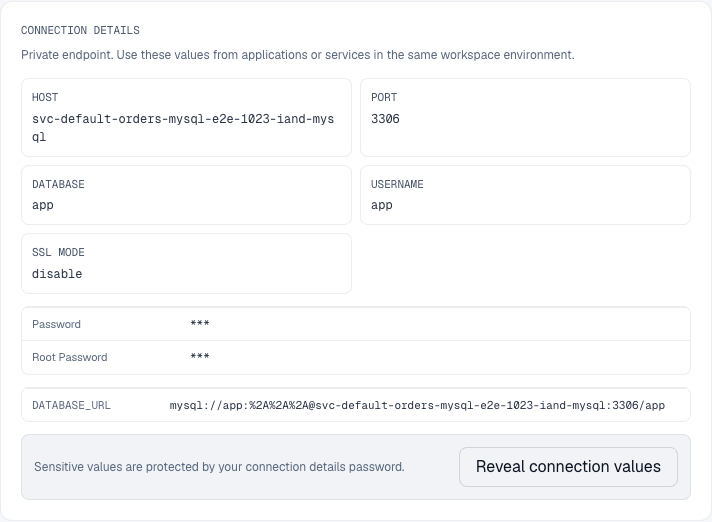
For manual database clients, reveal the host, port, database name, username, and password from Settings > Connection details. Sensitive fields require your connection-details password; Moltern may separately request account confirmation. Neither password is the generated MySQL password.
The standard MySQL port is 3306, but use the value displayed by Moltern.
Data And Deletion
MySQL data persists across normal restarts and service updates. Export important data before deletion, remove or update attached workloads, and confirm whether stored data should be deleted with the service.
Before You Start
Choose the workspace and environment that own the data. Your role must allow service creation and changes to the client that will connect. Reserve capacity for the database and its clients separately, and use non-sensitive test data first. Check the deployed engine version and application compatibility before migrating an existing database. A new catalog version is not approval for an in-place upgrade of populated data.
Version planning: MySQL 8.0 is now under sustaining support. Before a new production deployment, ask your platform administrator for an approved, maintained LTS version and a backup/upgrade plan. These connection examples do not make an older engine suitable for new production data. See the MySQL support announcement.
| Area | Behavior |
|---|---|
| Access | Private database protocol, normally port 3306 |
| Authentication | Generated native database credentials |
| Data | Persistent files; initialization also consumes workspace storage |
| Availability | Single instance, not automatic database failover |
| Transport | Use the displayed SSL mode; website HTTPS is separate |
Use Preview deploy, then Confirm deploy. Zero additional volumes does not mean zero storage usage. Allow the initial database setup to finish rather than creating several replacements while one is pending. When another catalog app offers MySQL as a dependency, choose a new instance for independent data/lifecycle, or reuse a compatible database intentionally. Reuse does not automatically create a separate schema or native identity for each consumer.
Use The Injected Connection In Node.js
The connection card lists the exact variable names supplied to an application.
After connecting, apply a new application deployment so it receives the updated
environment. Several attached databases can produce several scoped keys; do not
assume bare DATABASE_URL selects the intended database.
Install mysql2 in your own application, then set DATABASE_URL_VARIABLE to the
name of the injected key, not its secret value:
npm install mysql2
import mysql from 'mysql2/promise';

const key = process.env.DATABASE_URL_VARIABLE;
if (!key || !process.env[key]) throw new Error('Database connection missing');
const pool = mysql.createPool({
  uri: process.env[key],
  connectionLimit: 5,
  connectTimeout: 5000,
});
const [rows] = await pool.execute(
  'SELECT title, status FROM team_requests WHERE status = ? ORDER BY id',
  ['open'],
);
Keep the pool server-side, bound its size, handle unavailable connections and use
parameters for user input. Other drivers can require individual connection fields
or their own DSN format. A standard MySQL URI must not contain tcp(host:port)
in place of its hostname.
Connect A Coding Agent
Open the agent's Resources, select this database and choose Connect. Save permissions, complete account confirmation if requested and wait for runtime configuration. Use a fresh terminal if it still has the previous environment.

The agent can run a native database client without cluster administrator access. It receives selected connection context, not every database in the workspace. Network attachment still requires native MySQL authentication. Use a separate narrowly privileged native identity when a task should only read selected tables.
After removing a connection, test a fresh database connection. Removal is not the same as rotating a copied password or erasing data already read by the client.
Create And Query A Small Dataset
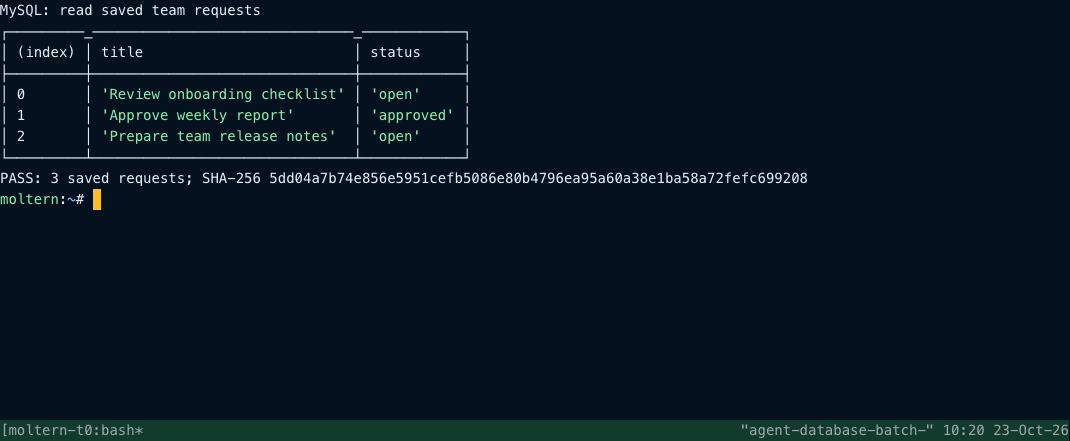
Run this from an authenticated client attached to the intended application database:
CREATE TABLE IF NOT EXISTS team_requests (
  id INTEGER PRIMARY KEY,
  title VARCHAR(255) NOT NULL,
  status VARCHAR(32) NOT NULL
);
INSERT INTO team_requests (id, title, status) VALUES
  (1, 'Review onboarding checklist', 'open'),
  (2, 'Approve weekly report', 'approved'),
  (3, 'Prepare team release notes', 'open');
SELECT title, status FROM team_requests ORDER BY id;
Expect three ordered records. Repeating the insert without an update strategy
causes duplicate-key errors, not a storage failure. Normal application access
should not need to read mysql.user, create unrelated databases or use root.
Keep passwords and full connection strings out of Git, browser code, screenshots,
terminal history and support messages.
Restart, Capacity And Backups
Use Stop service, wait until stopped, then Start service. Wait for Running, reconnect and repeat your query. Plan the interruption and configure client retries. Review CPU and RAM changes in Capacity. Increasing replicas does not create MySQL replication or automatic failover. Persistent files and a normal restart do not replace backups or prove recovery from every failure.
Use a compatible logical export, entering the password at the prompt:
mysqldump --host="$DB_HOST" --port="$DB_PORT" --user="$DB_USER" \
  --password --single-transaction --no-tablespaces "$DB_NAME" > backup.sql
Protect the export and test its restoration in a separate disposable database. The transaction option applies to transactional tables, not every storage engine or concurrent schema change. This template does not promise an automatically configured backup schedule.
Usage And Troubleshooting
Live Logs helps diagnose initialization, authentication and readiness errors.
Billing separates the database from its clients. Collection can lag writes;
small databases may round to 0 GiB. Unknown without a measurement timestamp is
not measured zero, and a byte sample is not a finalized invoice.
Before deletion, identify consumers, export important records and remove or move connections. Delete stored data permanently removes the selected files after cleanup. Keep workspace files retains data for later cleanup and continues counting it toward workspace storage. Wait for cleanup before creating replacements.
| Symptom | Check next |
|---|---|
| Setup remains pending | Deployment progress and Live Logs; share the service ID with support, not credentials |
| Connection times out | Running state, correct environment and completed private connection |
| Access denied | Current username, database and injected password |
| Missing variable | Exact scoped key and a fresh deployment or terminal session |
| Invalid connection URI | Standard MySQL URI or separate driver fields, not a Go DSN embedded inside a URI |
| Unexpected records | Intended database and instance, not merely a reachable endpoint |
Frequently Asked Questions
Can I connect from my laptop with the website URL? No. MySQL is a private database protocol, not a public HTTPS website. Use an explicitly connected server-side workload or an approved private access path.
Does connecting two applications isolate their tables? Not automatically. Review the native database users, schemas and grants. An attachment does not create a separate database identity or read-only permissions by itself.
Does a successful restart mean I have a backup? No. Maintain an independent export and test restoration. Schedule single-instance capacity changes and configure client retries for the interruption.