MongoDB Replica Set
This service provides an authenticated, private MongoDB replica set for applications that require transactions or change streams. It is used by the Rocket.Chat template as a managed database dependency.
The current configuration has one database member. Replica-set features do not make this a multi-node high-availability database. A process restart still interrupts connections until the member is ready again.
Choose the Right Database
Use this template when the application's supported database configuration requires a MongoDB replica set. It is distinct from the standalone MongoDB service. Selecting it does not automatically convert an existing standalone installation or migrate another application's data.
For a fresh Rocket.Chat installation, review Required services in the application's Moltern form and create its compatible database dependency there. Review the combined application and database capacity before confirming.
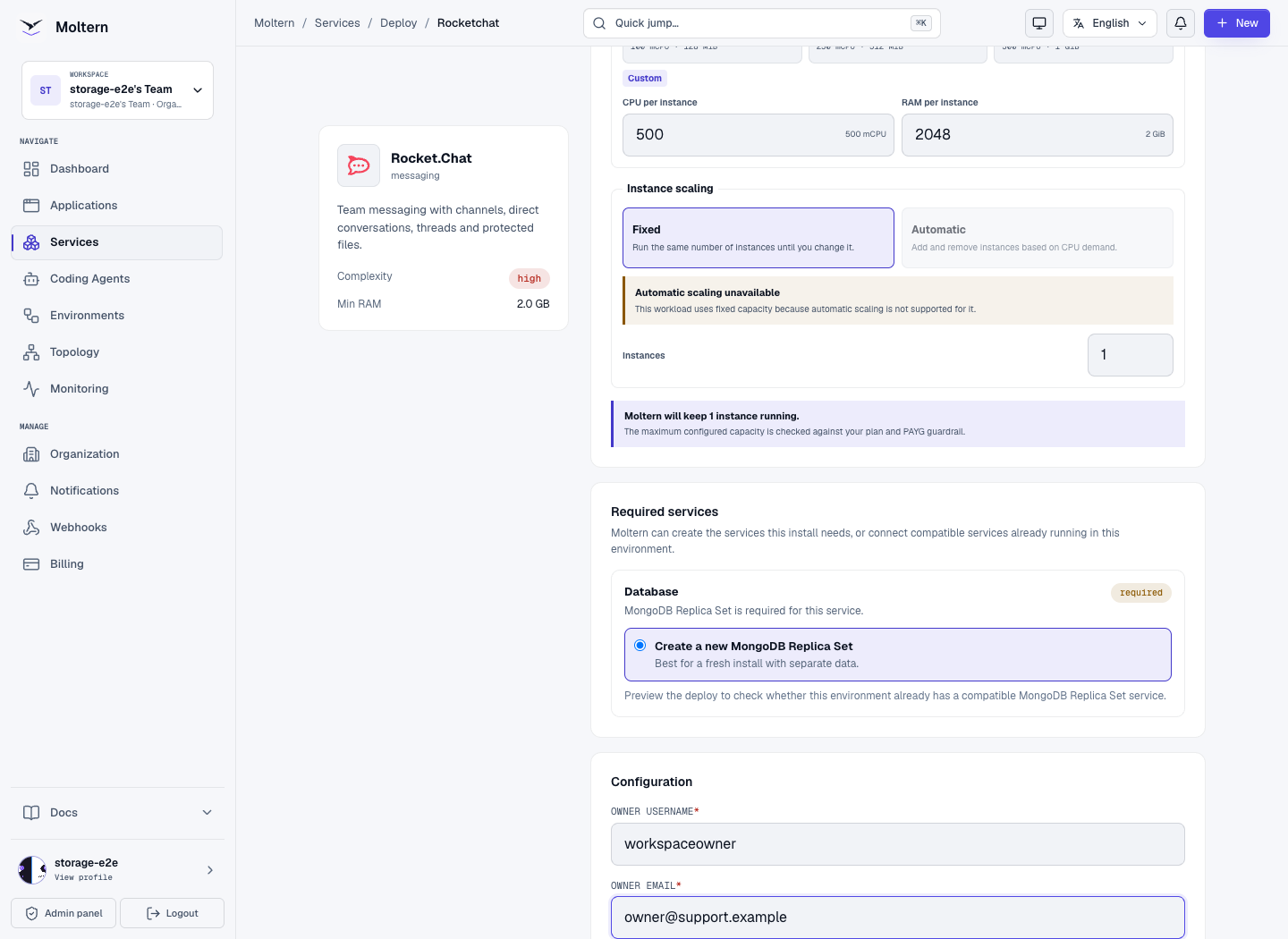
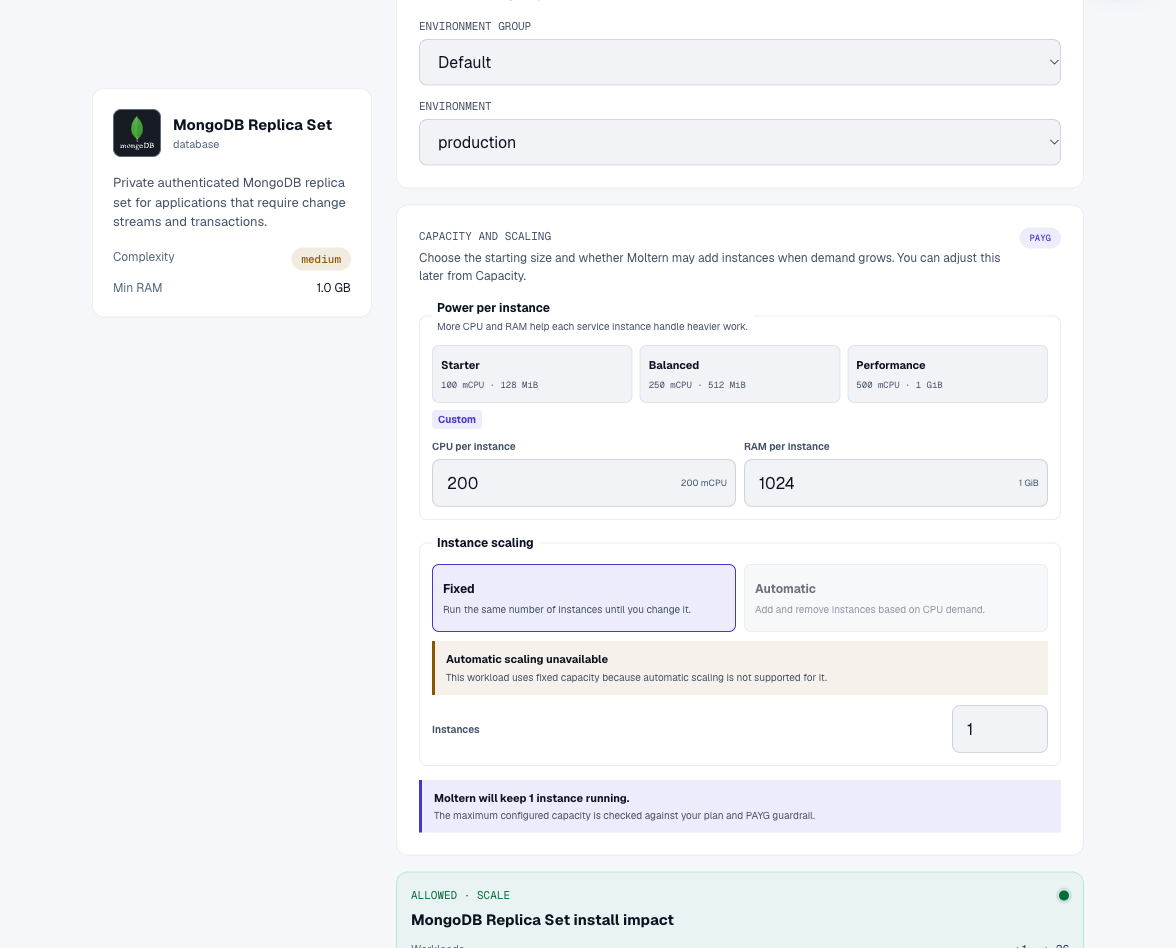
The starting database capacity is 200 mCPU and 1 GiB RAM. Persistent data uses an isolated location in the workspace's managed storage. Storage use grows with actual database data; the template does not create a separate dedicated storage volume for each installation.
Deploy A Standalone Replica-Set Service
You can also create this database without a parent application:
- Open Services and choose MongoDB Replica Set.
- Enter a clear name, such as
Team records replica. - Select the environment that will contain its clients.
- Review CPU and memory. Keep the single-instance configuration; increasing replicas is not a substitute for configuring a real multi-member replica set.
- Select Preview deploy, check workspace capacity, then Confirm deploy.
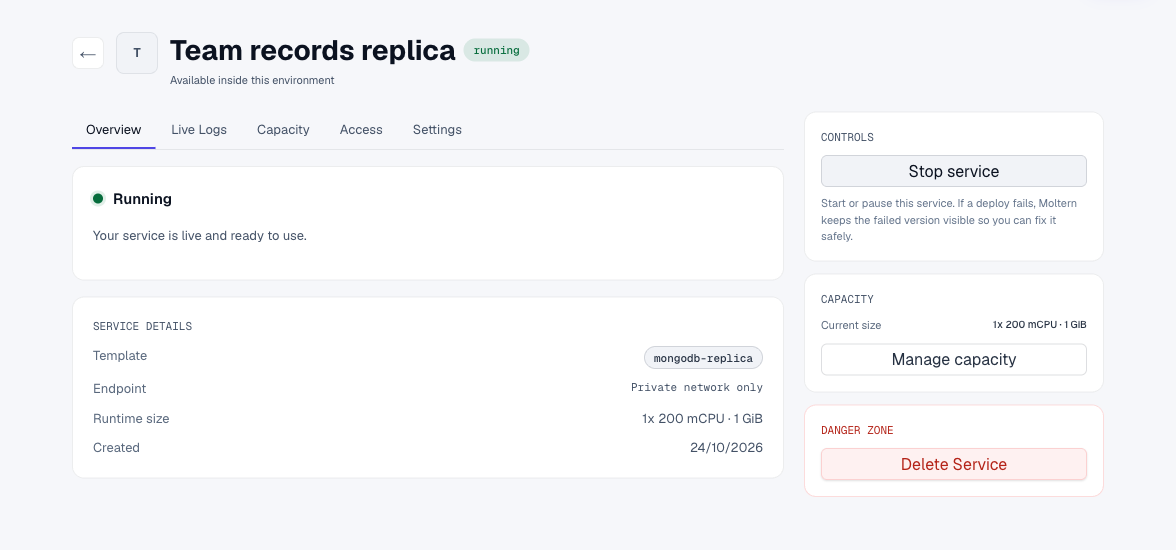
- Wait for Running before connecting an application or agent.
First start includes native database initialization and replica-set election. Follow the original installation's status rather than repeatedly creating replacements while it starts. For production, size for the dataset, indexes, connection count and traffic, not only this small starting configuration.
Connect a Trusted Workload
The database is private to its environment and does not expose a public website
or open database port on your application domain. Do not try to connect by
appending :27017 to your public Moltern address.
Use the consuming application's configured dependency or grant a supported private connection deliberately. For a client that needs explicit configuration, open the database's Settings > Connection details and complete the protected reveal flow. Keep its database username, password and connection string private.
Use the provided connection string rather than manually joining a password into
a URL. Reserved characters in a password need URL encoding. The configured
database/authentication database is app and the replica-set name is rs0.
Do not change these options independently of the service configuration.
The application account is not the database administrator. It must not receive server-wide user-management authority merely to read and write application data. Give only intended workloads access; a network connection is not a substitute for database authentication.
Connect An Application
Open the consuming application's Settings > Private service connections, select the replica-set service and choose Connect. Confirm your account when requested. Deploy a new application runtime so it receives the connection. Use the exact variable names displayed by the connection card, especially when several databases are attached.
Connect A Coding Agent
In the agent's Resources, select this database, choose Connect and save
permissions. Use a clear alias such as RECORDS. Read context alone does not
grant a database connection. Wait for configuration to finish and open a fresh
terminal if an existing one still has the previous environment.
Keep the generated connection server-side. Do not paste its secret value into source control, browser JavaScript, a screenshot or a support message. Protected Connection details uses your connection-details password; it is not your database password or your Moltern account password.

Use The Native Node.js Driver
Install the MongoDB driver in your application or attached agent workspace:
npm install mongodb
Set MONGODB_URL_VARIABLE to the name of the injected connection key. This
example reads the selected database without printing its credentials:
import { MongoClient } from 'mongodb';

const key = process.env.MONGODB_URL_VARIABLE;
if (!key || !process.env[key]) throw new Error('Database connection missing');
const client = new MongoClient(process.env[key], {
  maxPoolSize: 5,
  serverSelectionTimeoutMS: 5000,
});
await client.connect();
try {
  const requests = await client.db().collection('team_requests')
    .find({ status: 'open' }, { projection: { _id: 0, title: 1, status: 1 } })
    .sort({ id: 1 }).limit(20).toArray();
  console.table(requests);
} finally {
  await client.close();
}
Use a shared bounded client pool in a long-running application rather than opening a new pool for every request. Handle reconnects and unavailable databases without logging the connection string. Retain the supplied authentication-database and replica-set options; do not silently replace them with standalone connection settings or disable TLS validation.
Create A Small Dataset
From an authenticated client connected to the intended database, prepare a small collection before experimenting with real customer records:
const collection = client.db().collection('team_requests');
await collection.createIndex({ id: 1 }, { unique: true });
await collection.bulkWrite([
  { updateOne: {
    filter: { id: 1 },
    update: { $setOnInsert: { title: 'Review onboarding', status: 'open' } },
    upsert: true,
  } },
  { updateOne: {
    filter: { id: 2 },
    update: { $setOnInsert: { title: 'Approve weekly report', status: 'open' } },
    upsert: true,
  } },
]);
The example inserts missing records without overwriting later edits when rerun. Create indexes for actual query patterns and bound query result sizes.
Use A Transaction
Use a transaction when a group of changes must commit or abort together:
const db = client.db();
const session = client.startSession();
try {
  await session.withTransaction(async () => {
    await db.collection('team_requests').updateOne(
      { id: 2 }, { $set: { status: 'approved' } }, { session },
    );
    await db.collection('request_audit').insertOne(
      { requestId: 2, action: 'approved' }, { session },
    );
  });
} finally {
  await session.endSession();
}
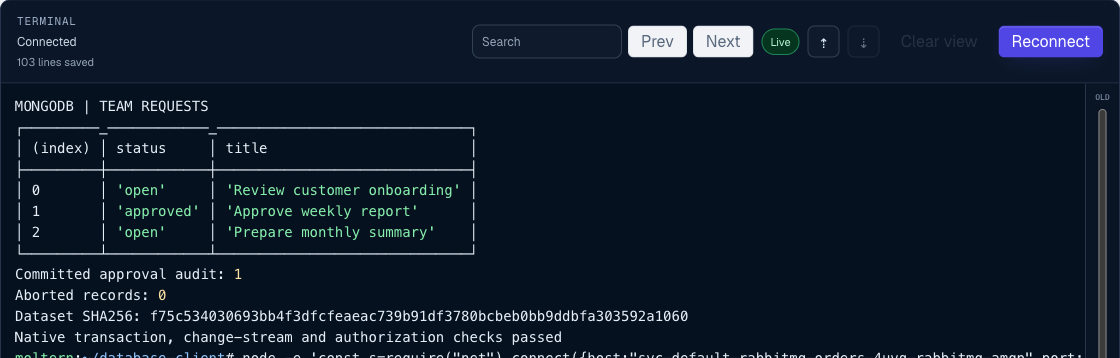
The driver can retry a transaction callback, so keep external effects such as email or payment requests outside that callback unless your design makes them idempotent. An aborted transaction must not leave a partially approved request.
Watch Changes
An attached client can watch changes to a collection it is authorized to use:
const changes = client.db().collection('team_requests').watch([], {
  maxAwaitTimeMS: 1000,
});
try {
  for await (const change of changes) {
    console.log(change.operationType, change.documentKey?._id);
  }
} finally {
  await changes.close();
}
Keep the watcher connection open while another client changes the collection. Limit watcher counts, store resume information securely when needed, and handle expired resume history. Do not log entire customer documents just to prove a watcher is active. Change streams do not make a single member highly available.
Native Permissions And Credential Recovery
The application identity should read and write only its intended database. It must not be able to list server-wide users, manage the server or read another application's database. A Moltern connection grant does not itself create a new collection-specific read-only native user.
For a restricted task, use a separately managed native identity with the required roles. Do not send a root password or a replica-set internal key to a coding agent merely to query application data.
If you forget the generated application login, use the protected connection reveal rather than deleting the service. A native password changed outside Moltern may differ from the original saved value; reconcile credentials through your authorized administration procedure. Never reset an existing data directory or rerun first-owner initialization as a login workaround.
For general agent setup, see Coding agents.
Restart and Recover
When coordinating a complete stack restart, stop the consuming application, restart the database, await actual readiness, then start the application. Stopping an application alone does not automatically pause every dependency.
An ordinary restart preserves stored data and database identity. Deleting stored data is different. Take appropriate backups before important changes, and do not attach an empty database expecting it to contain the previous application's accounts or records.
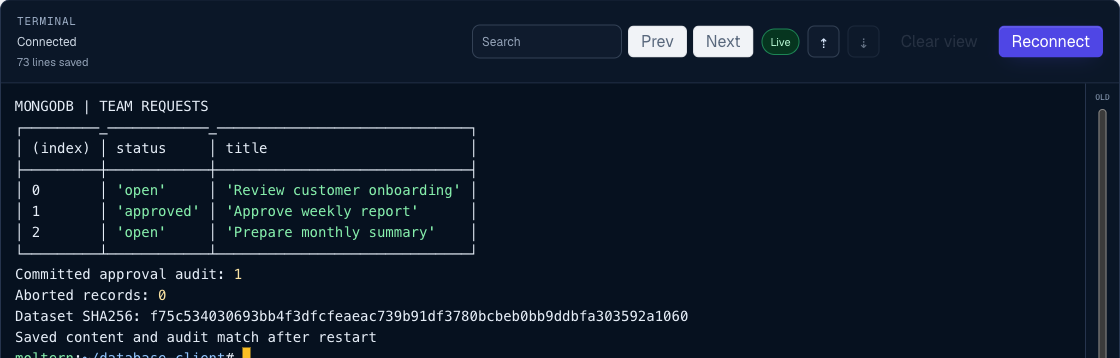
After the database is ready, reconnect a client and read the original records before creating new ones. Check a known approval or audit record as well as the row count; do not rerun initialization before checking the saved content.
MongoDB checks compatibility with its host runtime. If a deployment cannot find an eligible location or reports a compatibility error, review the service logs and contact support. Do not bypass a database safety check or switch its data to an incompatible engine version.
Plan Backups Separately
Persistent storage is not a backup. Keep database-consistent exports and test restoring them into a separate, compatible database before relying on them. Use supported MongoDB backup tools with an appropriately authorized identity; do not copy live database files as a substitute for a consistent backup.
Keep exports encrypted and access-controlled. Check that restored collections, indexes and application reads match the original, and review how your backup procedure handles native users, roles and ongoing writes. The single-member template does not by itself provide scheduled backups, automatic failover or point-in-time recovery.
Usage and Deletion
CPU and RAM appear as the database's own workload allocation. Database bytes are measured separately from application uploads and are collected periodically. Use the measurement timestamp when interpreting a recent write or deletion; a rounded GiB display is not the byte-level usage value.
Unknown or a pending measurement is not zero usage. A small dataset can also
round to 0 GiB even after a successful measurement. Check the timestamp before
concluding that a recent operation has not been counted. Review your plan's
included storage and PAYG settings before growing a dataset substantially.
For an automatically created dependency, use the parent application's deletion flow. A deliberately shared database can have other consumers: review them before deleting it. Export or preserve necessary data before confirming permanent removal; deletion is not a backup.
Troubleshooting
| Symptom | What to check |
|---|---|
| Public domain does not open the database | This is a private database, not a web application. Use a trusted connected client inside the environment. |
| Authentication fails | Use the database's own protected credentials and correct authentication database, not a Moltern login or Rocket.Chat account. |
| Transactions or change streams fail | Confirm that the client uses the replica-set template and its supplied connection options, not a standalone connection. |
| Consumer is temporarily unavailable after a restart | Wait for actual database readiness before restarting the consumer; a single-member replica has no failover member. |
| Required dependency cannot be deleted directly | Manage an automatically created database through its parent, checking stored-data consequences first. |
| Agent connection variable is missing after permissions change | Wait for the runtime update, then reconnect its terminal. An older terminal can still have the previous configuration; do not replace the database to fix it. |
| Restart takes longer than the first connection attempt | Check Live Logs for recovery and election progress. Allow recovery to finish; repeated restarts interrupt it. |
| Usage is zero or unknown immediately after writing | Check the measurement state and timestamp. Collection is periodic and small values may round down in GiB. |
Frequently Asked Questions
Is This A Highly Available Database?
No. This template enables replica-set features on one member. Transactions and change streams are available, but another member is not waiting to take over when this one stops.
Can I Open It From My Laptop's Browser?
No public database website is created. Use a connected Moltern application or agent with the native MongoDB driver. Do not publish a database port or place a database connection string in frontend code.
Does Connecting An Agent Give It Administrator Access?
The supplied application identity is restricted to its application database. A connection grant allows that workload to reach and authenticate to the database; it does not make the identity read-only or create collection-specific roles. Use separately managed native roles when a narrower task requires them.
Will Changing The Template Convert My Existing MongoDB Service?
No. Standalone and replica-set services have different deployment requirements. Plan a supported migration and recovery procedure rather than changing an existing populated data directory's engine or replica-set settings in place.
Can I Share One Database Between Several Applications?
Only connect workloads that should share its data. An application's database permissions still matter even inside a private environment. Review every consumer before deleting a shared service, and use separate native identities where different read/write permissions are required.